
Codex vs Claude Code: An Honest Comparison (2026)

Codex and Claude Code do the same job: you describe a task, and the agent reads your code, edits files and runs commands until it's done. In this post I will compare Codex vs Claude Code, two of the most popular coding agents right now, so you can pick the one that fits you. Codex is OpenAI's agent, with an open source CLI, an IDE extension, a desktop app and cloud tasks. Claude Code is Anthropic's agent, which also runs in the terminal, IDEs, a desktop app and the web. The short answer: Claude Code solves more of the hardest tasks in independent benchmarks, while Codex uses far fewer tokens per task, runs its commands in an OS sandbox by default, and so makes the same plan go further.
Important! Both tools change every week. Everything here was checked against the official docs on October 15, 2026, with Codex CLI 0.162.1 and Claude Code 2.1.300 (the commands were checked on Windows 11). Many comparisons out there still talk about GPT-5.x and Claude 4.x models, which are already retired or replaced.
What is Codex CLI?
Codex CLI is OpenAI's coding agent for the terminal. It's open source (Apache-2.0), written mostly in Rust, and it's one of several ways to use Codex:
- Codex CLI: the
codexcommand in your terminal. - IDE extension: for VS Code, Cursor and Windsurf, plus integrations for Xcode and JetBrains IDEs.
- ChatGPT desktop app: for macOS, Windows and Linux, where you run several projects in parallel and schedule recurring tasks.
- Codex cloud: tasks that run on OpenAI's machines, which you can start from the web, the app or the CLI (
codex cloud).
You sign in with your ChatGPT account (or an API key) and start it in your project folder:
cd my-project
codex
Then you ask for a change in plain English, and Codex reads the code, edits the files and runs commands inside a sandbox. It uses OpenAI's models only: GPT-6.1 Sol for complex work, GPT-6 Luna for quick, high-volume tasks and GPT-6 Astra as the most capable one.
What is Claude Code?
Claude Code is Anthropic's agentic coding tool. The docs describe it as a tool that "reads your codebase, edits files, runs commands, and integrates with your development tools". It also runs in several places: the terminal, a VS Code extension (that also installs in Cursor), a JetBrains plugin, a desktop app, the web at claude.ai/code and the Claude mobile app.
cd my-project
claude
It uses Claude models only. On paid plans the default is Claude Opus 5.5, and you can switch to Sonnet 5.5, Haiku 5.5 or Fable (for the hardest, longest tasks) with /model. Unlike Codex CLI, Claude Code isn't open source: its license is "All rights reserved" under Anthropic's commercial terms.
I already compared Claude Code with an AI editor in Cursor vs Claude Code. This time both sides are agents that work from the terminal, so the comparison gets closer.
Codex vs Claude Code: side-by-side comparison
| Codex | Claude Code | |
|---|---|---|
| Made by | OpenAI | Anthropic |
| Where it runs | CLI, IDE extension, desktop app, cloud, iOS | CLI, IDE extensions, desktop app, web, mobile |
| Open source CLI | Yes (Apache-2.0) | No |
| Models | GPT-6.1 Sol, GPT-6 Sol, GPT-6 Luna, GPT-6 Astra | Opus 5.5, Sonnet 5.5, Haiku 5.5, Fable |
| Safety model | OS sandbox plus approval policy | Permission modes (auto mode by default), optional sandbox |
| Project instructions | AGENTS.md | CLAUDE.md (can read AGENTS.md) |
| Extensibility | MCP, skills, plugins, hooks, subagents | MCP, skills, plugins, hooks, subagents, Agent SDK |
| Free option | Limited, in the desktop app | No |
| Full CLI access from | $20/month (ChatGPT Plus) | $20/month (Claude Pro) |
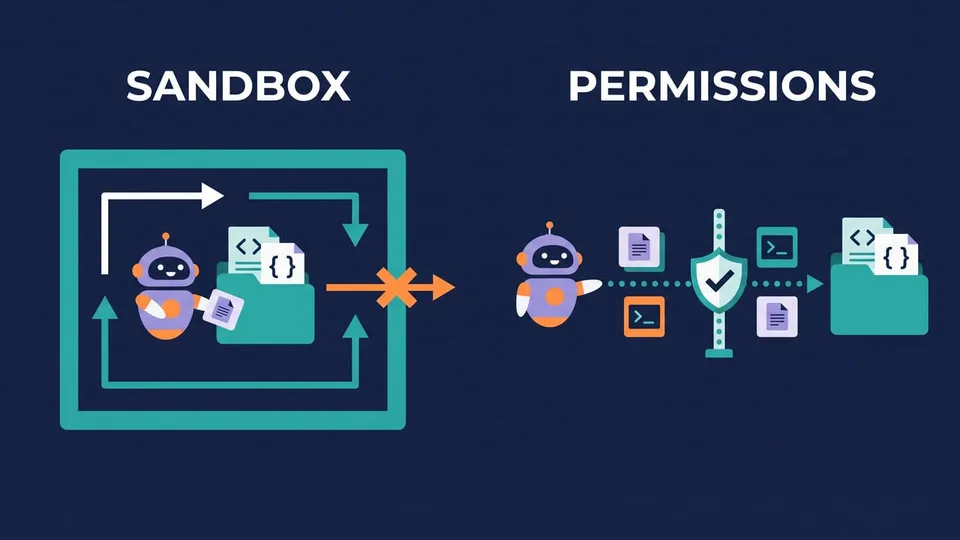
The main difference: sandbox vs permission prompts
Both agents run commands on your machine, and each one has its own way of stopping them from doing something you didn't want.
Codex: an OS sandbox around every command
Codex runs the commands it generates inside a sandbox enforced by the operating system: Seatbelt on macOS, bubblewrap on Linux and WSL2, and a native sandbox on Windows when it runs in PowerShell. There are three sandbox modes:
read-only: it can read files, but needs your approval to edit or run anything.workspace-write: it edits files and runs routine commands inside your project folder. The docs call it "the default low-friction mode for local work".danger-full-access: no sandbox at all.
On top of that, the approval policy decides when it stops to ask: on-request (it works inside the sandbox and asks before going beyond it) or never. You set both with flags or with /permissions inside a session:
codex --sandbox workspace-write --ask-for-approval on-request
Claude Code: permission modes and a classifier
Claude Code works with permission modes that you cycle with Shift + Tab: Manual (asks before edits and commands), acceptEdits, plan, auto, dontAsk and bypassPermissions. Since version 2.1.283, interactive terminal and VS Code sessions start in auto mode, where a second model, the classifier, reviews each action instead of you.
The sandbox is optional here. You turn it on with /sandbox, and the docs list it for macOS, Linux and WSL2.
claude --permission-mode manual
In practice, Codex limits what a command can reach, and Claude Code decides whether a command should run at all. If you're on native Windows and want an OS-level sandbox without setting up WSL, Codex has the edge.
Tip: Whatever tool you pick, run it in a Git repository and commit before a big task. Then git diff shows exactly what the agent changed, and you can undo it in one command. If you're new to Git on Windows, start with Git on Windows and GitHub: How to Install and Configure.
Codex vs Claude: which models do they use?
Codex uses OpenAI models only. The current lineup in the models docs:
- GPT-6.1 Sol (
gpt-6.1-sol): released on September 29, 2026, with "near-Astra performance for complex work at a lower cost than Astra". The recommended one for complex coding. - GPT-6 Luna (
gpt-6-luna): the efficient model for focused, repeatable tasks. - GPT-6 Astra (
gpt-6-astra): the most capable and the most expensive.
GPT-5.5 was retired from Codex for ChatGPT sign-in on October 14, 2026 (it still works with an API key). Codex can also run local models through LM Studio or Ollama with the --oss flag.
Claude Code uses Claude models only. On Pro, Max, Team and Enterprise it defaults to Opus 5.5, and /model switches to Sonnet 5.5 (daily coding), Haiku 5.5 (simple tasks) or Fable (the hardest, longest tasks).
Which one is better at coding? What the benchmarks say
Most "Codex vs Claude" posts pick a winner here. The result depends a lot on what you measure.
Artificial Analysis runs both agents on the same tasks. These are the best-scoring setups on their page as of October 15, 2026:
| Claude Code (Sonnet 5.5, max) | Codex (GPT-6.1 Sol, xhigh) | |
|---|---|---|
| Coding Agent Index | 68 | 63 |
| Terminal-Bench 4.0 | 66% | 55% |
| DeepSWE v1.1 | 72% | 73% |
| SWE-Atlas-QnA | 67% | 61% |
| Tokens per task | 27.7M | 3.2M |
| Time per task | 1.5 h | 15.5 min |
| API cost per task | $14.19 | $1.04 |
Here's how I read these numbers:
- Claude Code solves more of the hard tasks, mainly the long terminal ones (Terminal-Bench). It gets there by working longer: many more turns, tokens and minutes.
- Codex is much more efficient. It used about 9x fewer tokens and finished in a fraction of the time, with almost the same score on DeepSWE.
- The cost row is the pay-per-token API price. A subscription doesn't charge per task: there, using fewer tokens means more tasks before you hit the usage limit.
So if you need the best chance of finishing a hard, open-ended task, Claude Code has the lead today. If you run lots of well-defined tasks and care about speed and limits, Codex goes further with the same budget. These numbers move with every model release, so check the page again before you decide.
Codex pricing vs Claude Code pricing
Neither tool has its own subscription: Codex comes with ChatGPT plans and Claude Code with Claude plans. Prices as of October 15, 2026 (US dollars, before tax):
| Price | ChatGPT (Codex) | Claude (Claude Code) |
|---|---|---|
| $0 | Free: limited Codex in the desktop app (GPT-6 Luna) | Free: no Claude Code |
| $8/month | Go: GPT-6 Luna in the desktop app, for lightweight tasks | |
| $20/month | Plus: CLI, IDE extension, web and iOS, with GPT-6.1 Sol | Pro ($17/month billed yearly) |
| $100/month | Pro $100 | Max 5x |
| $200/month | Pro $200 | Max 20x |
| $500/month | Pro $500 (adds Ultrafast mode) | |
| Teams | Business: $25/user ($20 billed yearly) | Team: $25/seat ($20 yearly); Premium seat $125 ($100 yearly) |
| No subscription | API key, pay per token (no cloud features) | Claude Console, pay per token |
How the limits work:
- Codex on Plus gives an estimated 15 to 160 local messages with GPT-6.1 Sol, or 350 to 3,000 with GPT-6 Luna, per five-hour window. Weekly limits may apply too. Cloud tasks use more of your allowance than local ones, and the docs say Pro plans currently have no five-hour limit.
- Claude Code limits reset on a rolling five-hour window, with weekly limits on top on paid plans. They're shared with the Claude chat apps, so a long chat in the browser also uses your coding budget.
At $20, both give you the full CLI. Because Codex spends fewer tokens per task, the same plan tends to last longer before you hit the wall. If you plan to code with an agent for hours every day, both lines end up at $100 to $200 a month, and then the deciding factor is which model works better for your code.
How to install Codex CLI and Claude Code
Both have a native installer that doesn't need Node.js.
Install Codex CLI on macOS or Linux:
curl -fsSL https://chatgpt.com/codex/install.sh | sh
On Windows, in PowerShell:
powershell -ExecutionPolicy ByPass -c "irm https://chatgpt.com/codex/install.ps1 | iex"
You can also use npm (npm install -g @openai/codex) or Homebrew (brew install --cask codex). The npm package name has the @openai/ scope: the plain codex package is something else.
Install Claude Code on macOS, Linux or WSL:
curl -fsSL https://claude.ai/install.sh | bash
On Windows, in PowerShell:
irm https://claude.ai/install.ps1 | iex
Note: On native Windows, Anthropic recommends installing Git for Windows so Claude Code can use Bash (otherwise it falls back to PowerShell). I show how in Git Bash: How to Install and Use It on Windows.
Run codex --version and claude --version to confirm they're installed. Both ask you to sign in on the first run.
Codex CLI vs Claude Code commands
Once installed, the day-to-day commands are very similar:
| Task | Codex CLI | Claude Code |
|---|---|---|
| Start an interactive session | codex | claude |
| Run one prompt (scripts, CI) | codex exec "..." | claude -p "..." |
| Continue the last session | codex resume --last | claude --continue |
| Pick a model | /model or --model | /model or --model |
| Change what it can do | /permissions, --sandbox, --ask-for-approval | Shift + Tab, --permission-mode |
| Work in a new Git worktree | codex --worktree | claude --worktree |
| Send work to the cloud | codex cloud | claude --cloud "..." |
| Manage MCP servers | codex mcp | claude mcp |
| Create the instructions file | /init (AGENTS.md) | /init (CLAUDE.md) |
Both read from standard input in non-interactive mode, so you can pipe things into them:
git diff main | codex exec "review this diff for bugs"
git diff main | claude -p "review this diff for bugs"
AGENTS.md vs CLAUDE.md
Both agents read a Markdown file with your project's instructions: build commands, code style, architecture notes.

- Codex reads AGENTS.md, an open format that other agents use too. It loads a global one from
~/.codex/AGENTS.md, then one per folder from the project root down to where you started it, and joins them. The total is capped at 32 KiB by default (project_doc_max_bytes). - Claude Code reads
CLAUDE.mdat the start of every session, and it can read yourAGENTS.mdinstead when the repository already has one. It also keeps an auto memory with things it learns while you work.
Tip: If your team uses both tools, put the shared conventions in AGENTS.md. Codex reads it directly and Claude Code can use it too, so you don't keep two files in sync.
Which one should you choose?
Choose Codex if:
- you want an open source CLI you can read and audit;
- you want an OS sandbox by default, including on native Windows;
- you run many well-scoped tasks and care about speed and usage limits;
- you already pay for ChatGPT, since Codex comes with Plus.
Choose Claude Code if:
- you want the best results on long, multi-step tasks, even if they take more time and tokens;
- you want to hand over a whole task with fewer interruptions (auto mode);
- you want to build your own agents on top of it with the Agent SDK;
- you already pay for Claude.
Use both if your budget allows. One way to combine them: let one agent write the change and the other review it. With the shared AGENTS.md, switching between them costs almost nothing.
FAQ
Is Codex free?
Partly. The free ChatGPT plan includes limited Codex access in the desktop app with GPT-6 Luna. The CLI, IDE extension and GPT-6.1 Sol start on ChatGPT Plus ($20/month). You can also run the CLI with an OpenAI API key and pay per token.
Is Codex better than Claude Code?
Not across the board. On the Artificial Analysis benchmarks, Claude Code scores higher overall and on long terminal tasks, while Codex scores about the same on DeepSWE with roughly a ninth of the tokens and much less time. Pick based on what you need more: the best chance on hard tasks or efficiency.
Is Codex CLI open source?
Yes. The Codex CLI is open source under the Apache-2.0 license on GitHub (openai/codex), and it's written mostly in Rust. Claude Code is not open source.
Does Codex CLI work on Windows?
Yes. Install it with the PowerShell script or npm, and it runs natively in PowerShell with its own Windows sandbox. It also works in WSL2 (WSL1 is no longer supported). Claude Code works on native Windows too, and runs best with Git for Windows installed.
Can I use Codex and Claude Code in the same project?
Yes. They don't conflict: each keeps its own settings (~/.codex and ~/.claude). Keep shared instructions in AGENTS.md, commit between tasks, and give each agent its own task or its own Git worktree.
Conclusion
Codex and Claude Code have a lot in common: a similar CLI, the same $20 entry price, and support for MCP, skills, hooks and cloud tasks. Where they differ is safety (a sandbox in Codex, permission modes in Claude Code), how many tokens they spend per task and the model family behind them. Since both cost the same to start, the best test is your own codebase: give the same task to each one and compare the diffs.
See you next time!
Links
- Codex CLI on GitHub
- Codex CLI docs
- Codex: Sandboxing
- Codex: Models
- Codex: Pricing
- Claude Code overview
- Claude Code: Permission modes
- Claude pricing
- Artificial Analysis: Claude Code vs Codex
- AGENTS.md
Tags: ai|claude-code|codex|productivity