
SQL Joins Explained Visually (with Examples)

In this post I will explain SQL joins with diagrams, using the same two small tables for every join type, so you can see exactly which rows each one keeps and where the NULLs come from. The short answer: a join combines rows from two tables using a condition, usually a foreign key like orders.customer_id = customers.id. INNER JOIN keeps only the rows that match on both sides. LEFT JOIN keeps every row from the left table and fills the right side with NULL when there's no match. RIGHT JOIN does the same for the right table, and FULL OUTER JOIN keeps everything from both. CROSS JOIN pairs every row with every row, and a self join is a table joined with itself.

Note: I ran every query in this post with SQLite 3.53.4 (the version bundled with Node.js 24.21) on Windows 11, and the outputs below are the real results. The same SQL works in PostgreSQL and SQL Server. MySQL doesn't have FULL OUTER JOIN; I show the workaround in that section.
The example tables
We'll use a tiny shop: three customers and four orders. Ana has two orders, Ben has one, Carla has none, and order 104 was a guest checkout, so it has no customer.
CREATE TABLE customers (
  id   INTEGER PRIMARY KEY,
  name TEXT
);

CREATE TABLE orders (
  id          INTEGER PRIMARY KEY,
  customer_id INTEGER, -- NULL for guest checkouts
  product_id  INTEGER,
  total       INTEGER
);

INSERT INTO customers VALUES (1, 'Ana'), (2, 'Ben'), (3, 'Carla');
INSERT INTO orders VALUES
  (101, 1, 1, 50),
  (102, 1, 2, 30),
  (103, 2, 2, 20),
  (104, NULL, 1, 15);
Carla (a customer with no orders) and order 104 (an order with no customer) are the rows that make the join types return different results, so watch what happens to them in each query.
Tip: if you want to follow along without installing a database, Node.js 22.13+ has a built-in node:sqlite module. Save this as joins.mjs, paste the SQL above inside db.exec() and run node joins.mjs:
import { DatabaseSync } from 'node:sqlite'

const db = new DatabaseSync(':memory:')
db.exec(`/* CREATE TABLE and INSERT statements here */`)

console.table(
  db.prepare('SELECT * FROM customers c JOIN orders o ON o.customer_id = c.id').all(),
)
If you prefer TypeScript, see my post on Node.js with TypeScript.
What is a join in SQL?
In a relational database, data is split into tables to avoid repeating it: the customer's name lives in customers, and each order only stores the customer_id. A join puts that data back together at query time.
SELECT c.name, o.id AS order_id, o.total
FROM customers c
JOIN orders o ON o.customer_id = c.id;
c and o are aliases, so we don't have to write the full table names every time. The ON clause is the join condition: the database compares the rows of the two tables and combines the pairs where the condition is true. What happens to the rows that don't find a pair is what separates one join type from another.
If you use an ORM, it writes these joins for you, but it helps to know what it's generating. I compared ORMs, query builders and native drivers in this post (in Portuguese).
SQL join types at a glance
| Join | Keeps | Rows in our example |
|---|---|---|
INNER JOIN | Only rows with a match on both sides | 3 |
LEFT JOIN | All rows from the left table, plus matches from the right | 4 (Carla with NULLs) |
RIGHT JOIN | All rows from the right table, plus matches from the left | 4 (order 104 with NULLs) |
FULL OUTER JOIN | All rows from both tables | 5 |
CROSS JOIN | Every combination of rows (no condition) | 3 × 4 = 12 |
| Self join | A table joined with itself (any of the types above) | depends on the type |
LEFT, RIGHT and FULL are the outer joins: they keep rows that have no match. INNER keeps only matches. Now let's see each one.
INNER JOIN
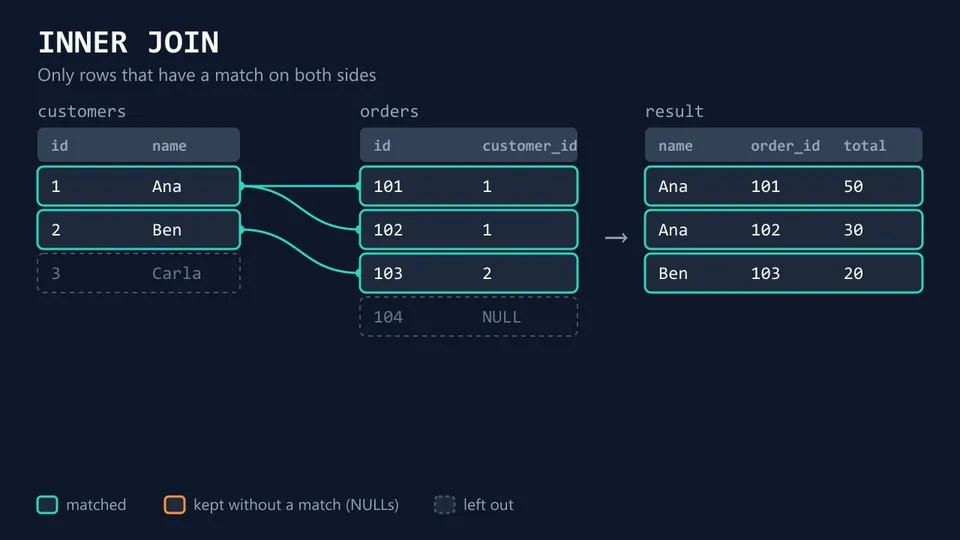
INNER JOIN returns only the rows where the join condition is true. It's the default: writing just JOIN gives you an inner join.
SELECT c.name, o.id AS order_id, o.total
FROM customers c
INNER JOIN orders o ON o.customer_id = c.id
ORDER BY c.id, o.id;
name  | order_id | total
Ana   | 101      | 50
Ana   | 102      | 30
Ben   | 103      | 20
(3 rows)
Carla is gone because she has no orders, and order 104 is gone because its customer_id is NULL (NULL = 1 is never true). Also note that Ana shows up twice. A join doesn't return "the customers that have orders": it returns one row for each matching pair. One customer with two orders gives two rows.
LEFT JOIN (LEFT OUTER JOIN)
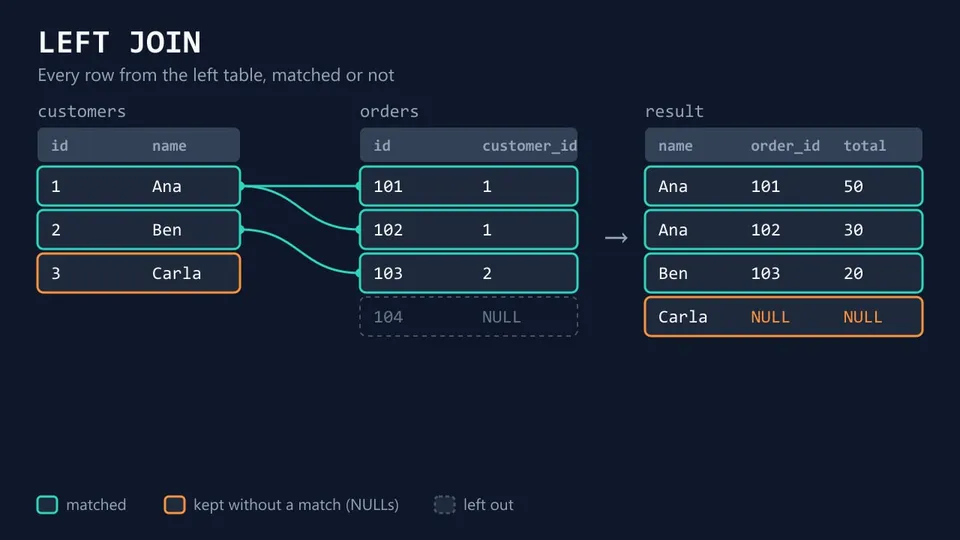
LEFT JOIN returns every row from the left table (the one in FROM). When a row has no match on the right, the right side's columns come back as NULL.
SELECT c.name, o.id AS order_id, o.total
FROM customers c
LEFT JOIN orders o ON o.customer_id = c.id
ORDER BY c.id, o.id;
name  | order_id | total
Ana   | 101      | 50
Ana   | 102      | 30
Ben   | 103      | 20
Carla | NULL     | NULL
(4 rows)
This is the join you want for questions like "list all customers and their orders, if any". Order 104 still doesn't appear: it isn't in the left table and it matches no customer.
LEFT JOIN vs LEFT OUTER JOIN
They are the same thing. OUTER is an optional keyword. The PostgreSQL docs put it this way: "The words INNER and OUTER are optional in all forms. INNER is the default; LEFT, RIGHT, and FULL imply an outer join." The same goes for RIGHT JOIN / RIGHT OUTER JOIN and FULL JOIN / FULL OUTER JOIN. Both forms give the same result and the same performance, so just pick one style and use it everywhere.
RIGHT JOIN
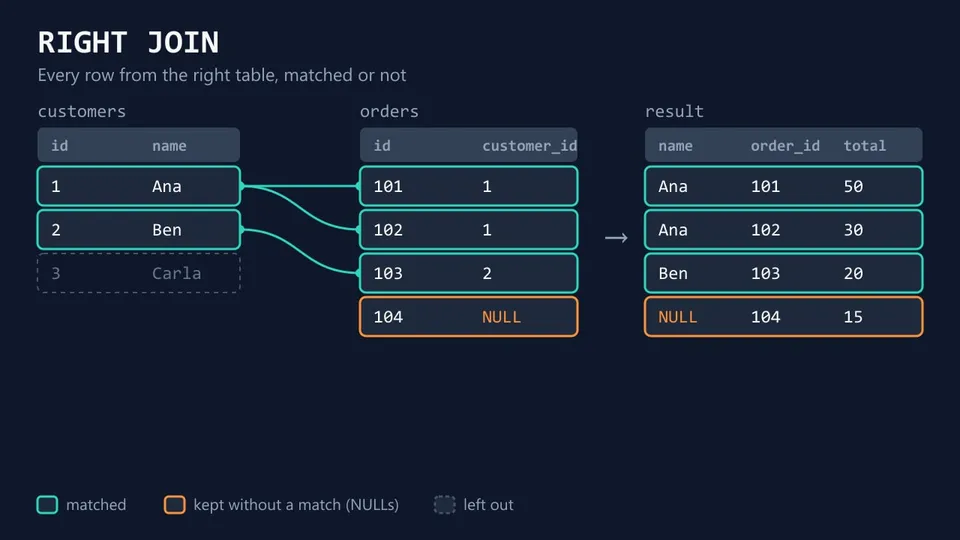
RIGHT JOIN is the mirror of LEFT JOIN: it keeps every row from the right table (the one after JOIN).
SELECT c.name, o.id AS order_id, o.total
FROM customers c
RIGHT JOIN orders o ON o.customer_id = c.id
ORDER BY o.id;
name  | order_id | total
Ana   | 101      | 50
Ana   | 102      | 30
Ben   | 103      | 20
NULL  | 104      | 15
(4 rows)
Now the guest order 104 is in, with NULL in the customer's columns, and Carla is out.
LEFT JOIN vs RIGHT JOIN
Any RIGHT JOIN can be written as a LEFT JOIN by swapping the tables. This query returns the same four rows as the one above:
SELECT c.name, o.id AS order_id, o.total
FROM orders o
LEFT JOIN customers c ON o.customer_id = c.id
ORDER BY o.id;
Most people use LEFT JOIN almost all the time, because reading "start from this table and bring in what matches" from top to bottom is easier, especially in queries with several joins. RIGHT JOIN works fine; you just won't see it often.
Note: SQLite only got RIGHT JOIN and FULL OUTER JOIN in version 3.39.0 (June 2022). If an old SQLite gives you a syntax error, that's why.
FULL OUTER JOIN
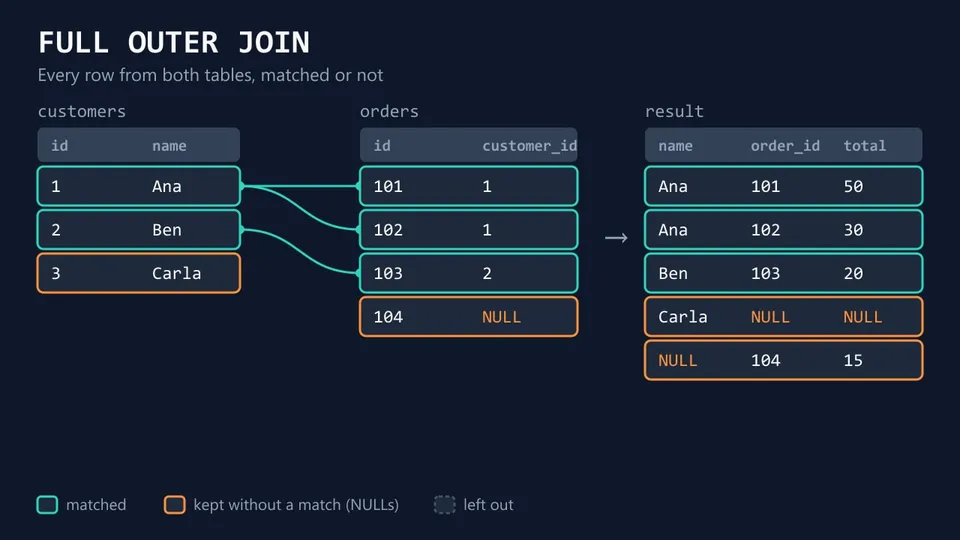
FULL OUTER JOIN keeps every row from both tables. Matches are combined; rows without a match on either side come back with NULLs on the other side.
SELECT c.name, o.id AS order_id, o.total
FROM customers c
FULL OUTER JOIN orders o ON o.customer_id = c.id
ORDER BY c.id, o.id;
name  | order_id | total
NULL  | 104      | 15
Ana   | 101      | 50
Ana   | 102      | 30
Ben   | 103      | 20
Carla | NULL     | NULL
(5 rows)
It's useful for reconciling two data sources: you see what matches, what's only on the left and what's only on the right in one result.
Tip: the NULL row comes first here because SQLite (and MySQL) sort NULL before other values. PostgreSQL sorts it last by default. Use NULLS FIRST / NULLS LAST in ORDER BY when the position matters.
FULL OUTER JOIN in MySQL
MySQL doesn't support FULL OUTER JOIN. Its JOIN syntax only has INNER, CROSS, LEFT, RIGHT and NATURAL joins (I checked the 9.7 and 26.10 manuals). The usual workaround is a LEFT JOIN plus the rows that only a RIGHT JOIN would add:
SELECT c.name, o.id AS order_id, o.total
FROM customers c
LEFT JOIN orders o ON o.customer_id = c.id
UNION ALL
SELECT c.name, o.id, o.total
FROM customers c
RIGHT JOIN orders o ON o.customer_id = c.id
WHERE c.id IS NULL;
The WHERE c.id IS NULL in the second part keeps only the orders with no customer, so I can use UNION ALL without getting the matched rows twice. Many examples online use plain UNION instead, which also removes duplicate rows that are legitimately in your data.
Inner join vs left join (vs outer join)
You'll pick between these two all the time. A simple way to decide:
- Use
INNER JOINwhen the row only makes sense with a match. "Orders with the customer's name" for an invoice: an order without a customer isn't what you want there. - Use
LEFT JOINwhen the left table is the list you need and the right side is optional. "All customers and how much they spent", including customers who spent nothing. - Use
FULL OUTER JOINwhen both sides are optional and you need to see the gaps on both.
"Outer join" is the family name for LEFT, RIGHT and FULL. So "inner join vs outer join" really means: do you want to drop the rows that have no match (inner) or keep them (outer)?
Anti join: rows with no match
SQL has no ANTI JOIN keyword, but the pattern is common: "customers who never ordered", "products never sold". The classic way is a LEFT JOIN that keeps only the rows where the right side came back empty:
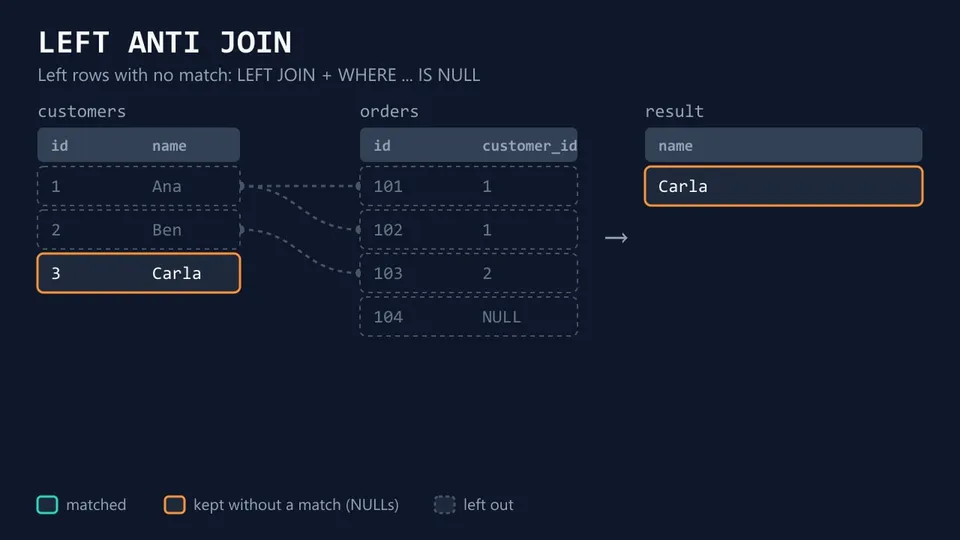
SELECT c.name
FROM customers c
LEFT JOIN orders o ON o.customer_id = c.id
WHERE o.id IS NULL;
name
Carla
(1 rows)
Check a column that can't be NULL in a real match, like the primary key (o.id). NOT EXISTS gives the same result and many people find it easier to read:
SELECT c.name
FROM customers c
WHERE NOT EXISTS (
  SELECT 1 FROM orders o WHERE o.customer_id = c.id
);
Important! Avoid WHERE c.id NOT IN (SELECT customer_id FROM orders) here. Order 104 has a NULL customer_id, and when the subquery returns a NULL, NOT IN returns no rows at all. NOT EXISTS doesn't have this problem.
CROSS JOIN
CROSS JOIN has no condition: it pairs every row of the first table with every row of the second (a Cartesian product). Three sizes and two colors give six rows:
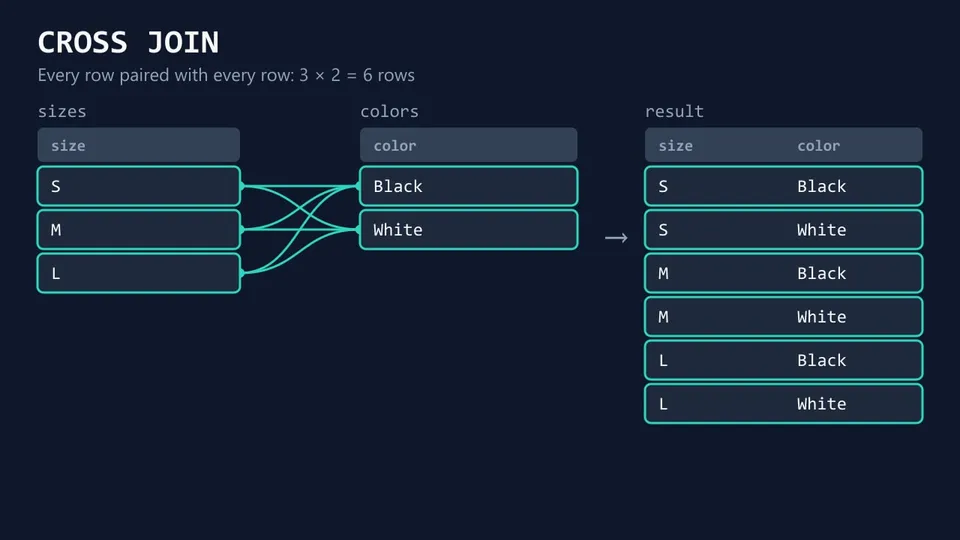
SELECT s.size, co.color
FROM sizes s
CROSS JOIN colors co;
size | color
S    | Black
S    | White
M    | Black
M    | White
L    | Black
L    | White
(6 rows)
It's handy for generating combinations (product variants, a calendar of dates × rooms). Be careful with big tables: 10,000 rows × 10,000 rows is 100 million rows. An accidental cross join usually comes from a missing or wrong ON condition.
Note: in MySQL, JOIN, CROSS JOIN and INNER JOIN are interchangeable, so CROSS JOIN ... ON works there. In standard SQL, CROSS JOIN doesn't take an ON clause.
SELF JOIN
A self join is a table joined with itself. There's no SELF JOIN keyword: you use a normal join and give the table two different aliases. The classic example is an employees table where manager_id points to another employee:
CREATE TABLE employees (id INTEGER PRIMARY KEY, name TEXT, manager_id INTEGER);
INSERT INTO employees VALUES (1, 'Maria', NULL), (2, 'John', 1), (3, 'Lucy', 1), (4, 'Pedro', 2);

SELECT e.name AS employee, m.name AS manager
FROM employees e
LEFT JOIN employees m ON m.id = e.manager_id;
employee | manager
Maria    | NULL
John     | Maria
Lucy     | Maria
Pedro    | John
(4 rows)
e is the employee and m is the same table playing the manager. I used LEFT JOIN so Maria, who has no manager, stays in the result.
Joining three or more tables
To join more tables, add one JOIN per table. Each new join combines the result so far with the next table. Here's a products table, so we can show the product of each order:
CREATE TABLE products (id INTEGER PRIMARY KEY, name TEXT);
INSERT INTO products VALUES (1, 'Keyboard'), (2, 'Mouse');

SELECT c.name, o.id AS order_id, p.name AS product
FROM customers c
JOIN orders o   ON o.customer_id = c.id
JOIN products p ON p.id = o.product_id
ORDER BY o.id;
name | order_id | product
Ana  | 101      | Keyboard
Ana  | 102      | Mouse
Ben  | 103      | Mouse
(3 rows)
Tip: if you start with a LEFT JOIN and then add an INNER JOIN to a table that depends on it, the inner join drops the rows the left join kept (the NULLs don't match anything). When the chain is optional, keep using LEFT JOIN all the way down.
Common SQL join mistakes
Filtering the right table in WHERE
This query is supposed to list all customers with their orders over 25:
SELECT c.name, o.id AS order_id, o.total
FROM customers c
LEFT JOIN orders o ON o.customer_id = c.id
WHERE o.total > 25
ORDER BY c.id, o.id;
name | order_id | total
Ana  | 101      | 50
Ana  | 102      | 30
(2 rows)
Ben and Carla disappeared. WHERE runs after the join: for Carla, o.total is NULL, and NULL > 25 isn't true, so the row is filtered out. The LEFT JOIN turned into an inner join. Move the condition to ON:
SELECT c.name, o.id AS order_id, o.total
FROM customers c
LEFT JOIN orders o ON o.customer_id = c.id AND o.total > 25
ORDER BY c.id, o.id;
name  | order_id | total
Ana   | 101      | 50
Ana   | 102      | 30
Ben   | NULL     | NULL
Carla | NULL     | NULL
(4 rows)
The PostgreSQL docs explain it: "a restriction placed in the ON clause is processed before the join, while a restriction placed in the WHERE clause is processed after the join. That does not matter with inner joins, but it matters a lot with outer joins."
COUNT(*) after a LEFT JOIN
SELECT c.name, COUNT(*) AS orders
FROM customers c
LEFT JOIN orders o ON o.customer_id = c.id
GROUP BY c.id, c.name;
name  | orders
Ana   | 2
Ben   | 1
Carla | 1
(3 rows)
Carla has no orders, but COUNT(*) counts rows, and the LEFT JOIN gave her one row (full of NULLs). Count a column from the right table instead: COUNT(o.id) ignores NULLs and returns 0 for Carla.
Duplicated rows (fan-out)
Remember that Ana appeared twice in the inner join. If you join customers with orders and then with another one-to-many table (say, addresses), every order gets repeated for every address, and a SUM(o.total) comes out inflated. When you need totals from two different child tables, aggregate each one in a subquery first and then join the results.
Why Venn diagrams don't tell the whole story
Most SQL joins diagrams online are two overlapping circles. They're a fine way to remember which side is kept, but they suggest that a join picks the rows that are "in both tables", like a set intersection. What a join really does is combine rows into new rows, and the count depends on how many pairs match: Ana is one element of the customers circle but two rows in the result. Lukas Eder of jOOQ wrote a good explanation of the problem: Venn diagrams describe UNION, INTERSECT and EXCEPT well, while a join is always "a cross product with a predicate". That's why the diagrams in this post show rows and the lines between them.
FAQ
What are the 4 main types of joins in SQL?
INNER JOIN, LEFT JOIN, RIGHT JOIN and FULL OUTER JOIN. Many lists also include CROSS JOIN and self join; a self join isn't a separate type, just a table joined with itself.
What's the difference between JOIN and INNER JOIN?
None. JOIN alone means INNER JOIN in every major database.
Is LEFT JOIN faster than INNER JOIN?
They answer different questions, so compare them only when both give the result you need. An inner join can be cheaper because the database can drop rows early, but it depends on your indexes and data. Check the plan with EXPLAIN instead of guessing.
What's the difference between JOIN and UNION?
A join puts columns side by side: it combines rows from different tables into wider rows. UNION stacks rows: it appends the results of two queries with the same columns into a longer result.
Conclusion
Every SQL join starts the same way, pairing rows where the ON condition is true. The type only decides what happens to rows without a pair: INNER drops them, LEFT and RIGHT keep one side, FULL keeps both. With that in mind, the common mistakes make sense too: a WHERE on the right table drops the NULL rows a LEFT JOIN just kept, and a one-to-many join multiplies rows.
When a join returns more or fewer rows than you expected, look for the rows without a match in your data, like Carla and order 104 here, and for one-to-many relations that repeat rows.