
Clean Architecture vs Hexagonal Architecture in Node.js

If you search for how to structure a Node.js backend, two names keep showing up, and the explanations often make them sound like rivals. In this post I will compare Clean Architecture vs Hexagonal Architecture by building the same small app both ways. The short answer: they share one goal, keeping business rules independent from frameworks and databases, and one mechanism, dependency inversion. Hexagonal Architecture only draws the line between the application and the outside world. Clean Architecture also tells you how to organize both sides of that line, with entities, use cases, controllers and presenters.
Note: I ran all the code in this post with Node.js 24.21, TypeScript 7.0.2 and Express 5.3 on Windows 11. Node runs the .ts files directly (with "type": "module" in package.json), so there's no build step. The outputs below are the real ones.
What is Hexagonal Architecture?
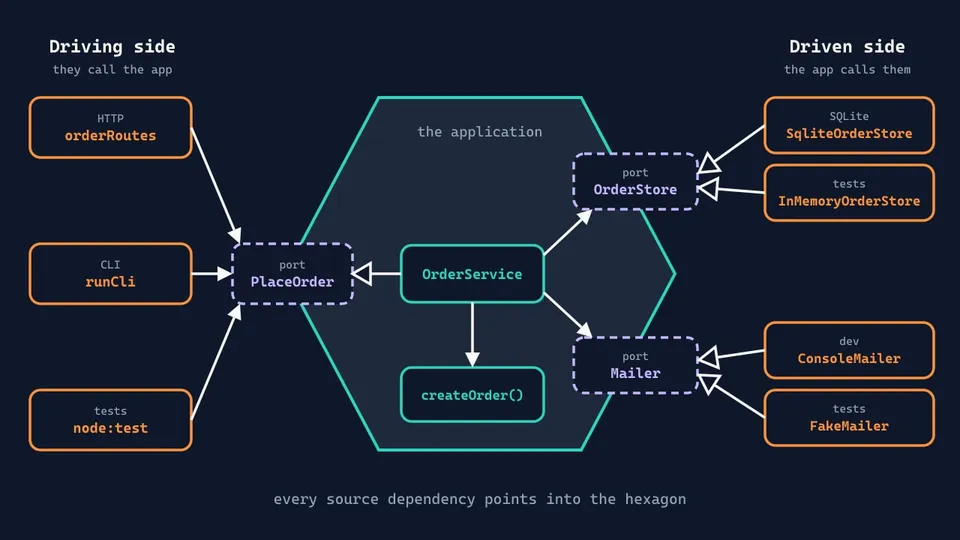
Hexagonal Architecture is the popular name of the Ports and Adapters pattern, published by Alistair Cockburn in 2005. Its intent is to "allow an application to equally be driven by users, programs, automated test or batch scripts". In other words, the web UI is only one way in, and your tests should be able to use the application exactly as the UI does.
The pattern has two parts:
- A port is a boundary of the application, an API for one kind of conversation with the outside world. Cockburn's definition: "A port identifies a purposeful conversation."
- An adapter plugs a specific technology into a port and translates between the two.
Ports come in two kinds. On the driving (primary) side, something outside calls the application: an HTTP route, a CLI, a test. On the driven (secondary) side, the application calls something outside: a database, an email service.
The hexagon has nothing to do with the number six. Cockburn drew it that way to get away from the top-to-bottom picture of layers and to leave room for as many ports as you need, though he prefers just two to four.
The pattern has no opinion on how to organize the code inside the hexagon.
What is Clean Architecture?
Clean Architecture is a pattern Robert C. Martin described in 2012. He didn't present it as a competitor to hexagonal. The article puts Hexagonal Architecture on a list of related ideas and says: "Though these architectures all vary somewhat in their details, they are very similar."
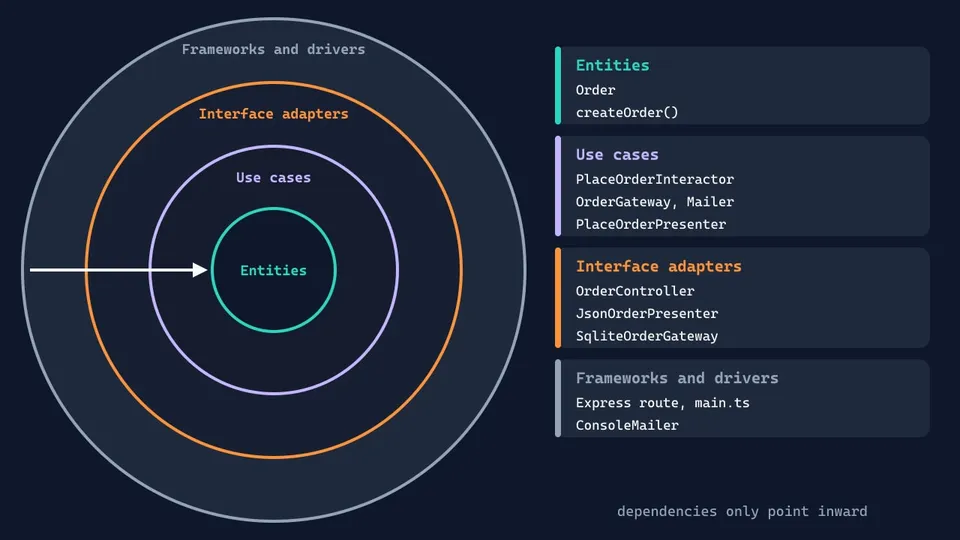
Clean Architecture organizes the code in concentric circles:
- Entities: the business rules.
- Use cases: the application-specific rules, one workflow at a time.
- Interface adapters: controllers, presenters and gateways, which convert data between the use cases and the outside.
- Frameworks and drivers: the web framework, the database and other tools.
The circles follow the Dependency Rule: "source code dependencies can only point inwards". An entity knows nothing about a use case, and a use case knows nothing about Express.
The circles are schematic. Martin says you can have more than four, as long as the rule holds.
Clean Architecture vs Hexagonal Architecture: the differences
Here's the comparison. We'll see most of these rows in code in the next sections:
| Hexagonal Architecture | Clean Architecture | |
|---|---|---|
| Author and year | Alistair Cockburn, 2005 | Robert C. Martin, 2012 |
| Main idea | Inside vs outside | Concentric layers with the Dependency Rule |
| Inside the application | Not specified | Entities and use cases |
| Outside the application | Adapters, split into driving and driven | Interface adapters, plus frameworks and drivers |
| Contract names | Ports | Boundaries, gateways |
| How results get out | Not specified, usually a return value | The use case calls a presenter through an interface |
| Where SQL lives | In a driven adapter | In the interface adapters circle |
| How much it prescribes | Little | More |
The dependency direction is the same in both. If you've read my post on the SOLID principles in TypeScript, both are the dependency inversion principle applied to a whole application.
Hexagonal Architecture in Node.js
Let's see it in practice with the order example from that post: POST /orders validates an order, adds 8% sales tax, saves it and sends an email. Here is the folder structure:
src/
├── application/
│   ├── order.ts
│   ├── order-service.ts
│   └── ports.ts
├── adapters/
│   ├── driving/
│   │   ├── http.ts
│   │   └── cli.ts
│   └── driven/
│       ├── sqlite-order-store.ts
│       └── console-mailer.ts
└── main.ts
Everything inside application/ is the hexagon. The business rule has no imports at all:
// application/order.ts
export type OrderItem = { sku: string; price: number; quantity: number }

export type Order = {
  id: string
  customerEmail: string
  items: OrderItem[]
  total: number
}

export class InvalidOrderError extends Error {}

const SALES_TAX = 0.08

export function createOrder(
  id: string,
  customerEmail: string,
  items: OrderItem[],
): Order {
  if (items.length === 0) {
    throw new InvalidOrderError('Order has no items')
  }

  const subtotal = items.reduce(
    (sum, item) => sum + item.price * item.quantity,
    0,
  )

  return { id, customerEmail, items, total: subtotal * (1 + SALES_TAX) }
}
The ports are TypeScript interfaces, and they belong to the application:
// application/ports.ts
import type { Order, OrderItem } from './order.ts'

// Driving port: what the outside world can ask the application to do
export interface PlaceOrder {
  place(customerEmail: string, items: OrderItem[]): Promise<Order>
}

// Driven ports: what the application needs from the outside world
export interface OrderStore {
  save(order: Order): Promise<void>
}

export interface Mailer {
  send(to: string, body: string): Promise<void>
}
OrderService implements the driving port and uses the driven ones:
// application/order-service.ts
import { randomUUID } from 'node:crypto'
import { createOrder, type Order, type OrderItem } from './order.ts'
import type { Mailer, OrderStore, PlaceOrder } from './ports.ts'

export class OrderService implements PlaceOrder {
  private readonly store: OrderStore
  private readonly mailer: Mailer

  constructor(store: OrderStore, mailer: Mailer) {
    this.store = store
    this.mailer = mailer
  }

  async place(customerEmail: string, items: OrderItem[]): Promise<Order> {
    const order = createOrder(randomUUID(), customerEmail, items)

    await this.store.save(order)
    await this.mailer.send(
      order.customerEmail,
      `Thanks for your order! Total: $${order.total.toFixed(2)}`,
    )

    return order
  }
}
Now the adapters. The HTTP one is a driving adapter, so it translates a request into a call to the port and the result into a response:
// adapters/driving/http.ts
import { Router } from 'express'
import { InvalidOrderError } from '../../application/order.ts'
import type { PlaceOrder } from '../../application/ports.ts'

export function orderRoutes(placeOrder: PlaceOrder): Router {
  const router = Router()

  router.post('/orders', async (req, res) => {
    try {
      const order = await placeOrder.place(req.body.email, req.body.items)
      res.status(201).json({ id: order.id, total: order.total.toFixed(2) })
    } catch (error) {
      if (error instanceof InvalidOrderError) {
        res.status(422).json({ error: error.message })
        return
      }
      throw error
    }
  })

  return router
}
The SQLite one is a driven adapter. It implements a port, and it's the only file that knows SQL:
// adapters/driven/sqlite-order-store.ts
import type { DatabaseSync } from 'node:sqlite'
import type { Order } from '../../application/order.ts'
import type { OrderStore } from '../../application/ports.ts'

export class SqliteOrderStore implements OrderStore {
  private readonly db: DatabaseSync

  constructor(db: DatabaseSync) {
    this.db = db
    db.exec(`CREATE TABLE IF NOT EXISTS orders (
      id TEXT PRIMARY KEY, email TEXT NOT NULL, total REAL NOT NULL
    ) STRICT`)
  }

  async save(order: Order) {
    this.db
      .prepare('INSERT INTO orders (id, email, total) VALUES (?, ?, ?)')
      .run(order.id, order.customerEmail, order.total)
  }
}
Note: DatabaseSync is the class name in Node 24. The current node:sqlite docs call it Database and keep DatabaseSync as a deprecated alias.
main.ts connects everything. This is the only file that knows all the concrete classes:
// main.ts
import { DatabaseSync } from 'node:sqlite'
import express from 'express'
import { ConsoleMailer } from './adapters/driven/console-mailer.ts'
import { SqliteOrderStore } from './adapters/driven/sqlite-order-store.ts'
import { runCli } from './adapters/driving/cli.ts'
import { orderRoutes } from './adapters/driving/http.ts'
import { OrderService } from './application/order-service.ts'

const db = new DatabaseSync('orders.db')
const service = new OrderService(new SqliteOrderStore(db), new ConsoleMailer())

if (process.argv[2] === 'place-order') {
  await runCli(service, process.argv.slice(3))
} else {
  const app = express()
  app.use(express.json())
  app.use(orderRoutes(service))
  app.listen(3000, () => console.log('Listening on http://localhost:3000'))
}
Let's test it? Start the server with node src/main.ts and send an order:
curl -X POST localhost:3000/orders \
  -H "content-type: application/json" \
  -d '{"email":"[email protected]","items":[{"sku":"mug","price":12.5,"quantity":2}]}'
{"id":"187a8f34-99a8-44a0-be56-7d399353a63b","total":"27.00"}
Now look at the runCli branch above. That's a second driving adapter, 18 lines long, using the same port with no change inside the hexagon:
node src/main.ts place-order --email [email protected] --sku mug --price 25
Email to [email protected]: Thanks for your order! Total: $27.00
Order 5b09e0c2-75b3-4309-9d06-6f69e954b960: $27.00
An MCP server tool or a queue consumer would plug in the same way. So do tests, which are one more driving adapter, with fake driven adapters and no database:
test('places an order and emails the total', async () => {
  const store = new InMemoryOrderStore()
  const mailer = new FakeMailer()
  const service = new OrderService(store, mailer)

  const order = await service.place('[email protected]', [
    { sku: 'mug', price: 12.5, quantity: 2 },
  ])

  assert.equal(order.total, 27)
  assert.equal(store.orders.length, 1)
  assert.equal(mailer.sent[0], 'Thanks for your order! Total: $27.00')
})
Clean Architecture in Node.js
Now the same app with four circles, each one a folder:
src/
├── entities/
│   └── order.ts
├── use-cases/
│   └── place-order.ts
├── interface-adapters/
│   ├── order-controller.ts
│   ├── order-presenter.ts
│   └── sqlite-order-gateway.ts
└── frameworks/
    ├── console-mailer.ts
    └── main.ts
entities/order.ts is byte-identical to application/order.ts. The other changes start at the use case, which owns the interfaces it needs, including one for its output:
// use-cases/place-order.ts
import { randomUUID } from 'node:crypto'
import {
  createOrder,
  InvalidOrderError,
  type Order,
  type OrderItem,
} from '../entities/order.ts'

export type PlaceOrderInput = { customerEmail: string; items: OrderItem[] }
export type PlaceOrderOutput = { orderId: string; total: number }

// Output boundary: implemented by a presenter in an outer circle
export interface PlaceOrderPresenter {
  orderPlaced(output: PlaceOrderOutput): void
  orderRejected(reason: string): void
}

// Gateways: implemented in the outer circles
export interface OrderGateway {
  save(order: Order): Promise<void>
}

export interface Mailer {
  send(to: string, body: string): Promise<void>
}

export class PlaceOrderInteractor {
  private readonly orders: OrderGateway
  private readonly mailer: Mailer

  constructor(orders: OrderGateway, mailer: Mailer) {
    this.orders = orders
    this.mailer = mailer
  }

  async execute(input: PlaceOrderInput, presenter: PlaceOrderPresenter) {
    let order: Order
    try {
      order = createOrder(randomUUID(), input.customerEmail, input.items)
    } catch (error) {
      if (error instanceof InvalidOrderError) {
        presenter.orderRejected(error.message)
        return
      }
      throw error
    }

    await this.orders.save(order)
    await this.mailer.send(
      order.customerEmail,
      `Thanks for your order! Total: $${order.total.toFixed(2)}`,
    )

    presenter.orderPlaced({ orderId: order.id, total: order.total })
  }
}
Look at what changed from OrderService. execute returns nothing. The use case hands its result to a presenter, and it reports a rejected order as an outcome, so HTTP status codes stay out of this circle. Martin's article also says that the data crossing a boundary should be "isolated, simple, data structures", which is why the output is a PlaceOrderOutput and not the Order itself.
The presenter turns that output into a view:
// interface-adapters/order-presenter.ts
import type {
  PlaceOrderOutput,
  PlaceOrderPresenter,
} from '../use-cases/place-order.ts'

export type HttpView = { status: number; body: unknown }

export class JsonOrderPresenter implements PlaceOrderPresenter {
  view: HttpView = { status: 500, body: { error: 'No result' } }

  orderPlaced(output: PlaceOrderOutput) {
    this.view = {
      status: 201,
      body: { id: output.orderId, total: output.total.toFixed(2) },
    }
  }

  orderRejected(reason: string) {
    this.view = { status: 422, body: { error: reason } }
  }
}
The controller converts the input and creates one presenter per request:
// interface-adapters/order-controller.ts
import type {
  PlaceOrderInput,
  PlaceOrderInteractor,
} from '../use-cases/place-order.ts'
import { type HttpView, JsonOrderPresenter } from './order-presenter.ts'

type CreateOrderBody = { email: string; items: PlaceOrderInput['items'] }

export class OrderController {
  private readonly placeOrder: PlaceOrderInteractor

  constructor(placeOrder: PlaceOrderInteractor) {
    this.placeOrder = placeOrder
  }

  async create(body: CreateOrderBody): Promise<HttpView> {
    const presenter = new JsonOrderPresenter()
    await this.placeOrder.execute(
      { customerEmail: body.email, items: body.items },
      presenter,
    )
    return presenter.view
  }
}
Important! Don't share a presenter between requests. Node handles concurrent requests in one process, so a singleton presenter with a view field would mix up the responses of two customers whose requests overlap.
This controller doesn't import Express. It lives in the interface adapters circle, so Express stays where the Dependency Rule wants it, in the outermost one:
// frameworks/main.ts (the route)
app.post('/orders', async (req, res) => {
  const view = await controller.create(req.body)
  res.status(view.status).json(view.body)
})
The SQL class is the same as the hexagonal one under another name, SqliteOrderGateway. Many projects keep it in an infrastructure folder, but Martin's article places it in the interface adapters circle: "all the SQL should be restricted to this layer". The outer circle holds the database itself.
What's different in the code
Both versions pass the same scenarios with the same HTTP responses: 201 for a valid order and 422 with {"error":"Order has no items"} for an empty one. Here's how the path of a request differs:
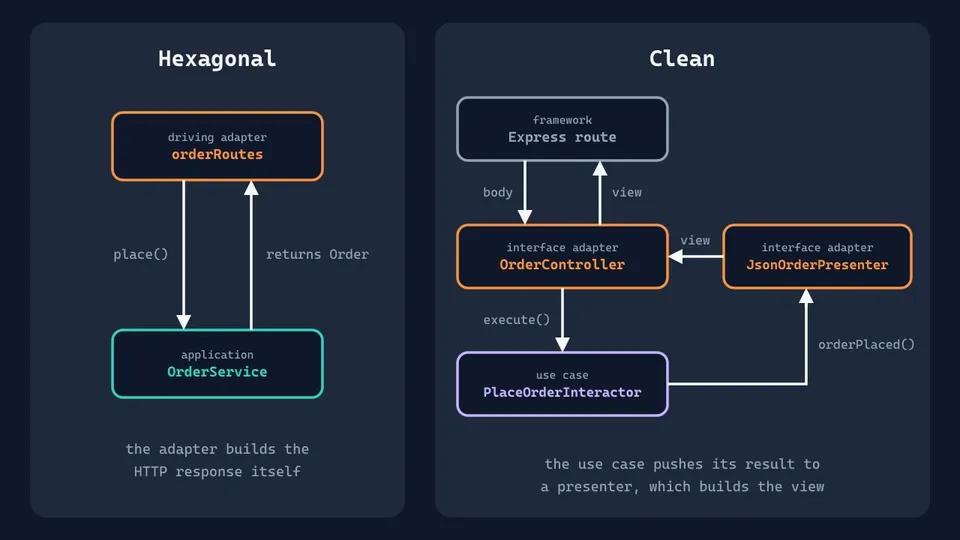
Without the CLI, hexagonal takes about 130 lines in 7 files and Clean takes 180 lines in 7 files. The extra lines are the controller, the presenter and the input and output types. The gap is small because the example is small, and it grows with each new use case.
Tests change too. In hexagonal you assert on the return value, and in Clean you pass a test presenter and assert on what it received.
The Express code also sits at a different distance. In hexagonal it shares one adapter with the HTTP translation. In Clean they're split, so you could test OrderController with no server.
If you drop the presenter and make execute return its output, a common simplification for JSON APIs, the Clean version looks almost exactly like the hexagonal one. The folders have different names, but the dependencies are the same. The presenter earns its place when the same use case feeds several output formats, like a JSON API and a server-rendered page.
Which one should you choose?
Most of the decision is about how much structure your team wants written down:
- Choose Hexagonal Architecture when you want one simple rule and have several ways in or out of the app: API, CLI, queue consumers, third-party services that may change. It's also an easy first step for an existing Express codebase, since you can move one dependency at a time behind a port.
- Choose Clean Architecture when several teams work on a large codebase and you want one agreed place for each kind of code. The cost is more files and more data mapping per feature.
- Mix them if you like parts of both. Nothing stops you from having one use case per file, as in Clean, and calling your interfaces ports, with the driving and driven split from hexagonal. Since hexagonal leaves the inside open, Clean's entities and use cases fit inside the hexagon.
- Use neither for a small CRUD API or a prototype, where nearly every interface would have a single implementation forever. A plain route calling a query is easier to read. You can extract the business rules later when they appear.
Pitfalls in Node.js and TypeScript
These are the problems you'll run into on our stack, whichever pattern you pick:
- Interfaces don't exist at runtime. That's fine for manual wiring like our
main.ts, but a DI container needs a runtime token. In NestJS an interface can't be the token, so you use aSymbolwith@Inject()or an abstract class as the port. - Folders don't enforce anything. TypeScript will happily compile
import type { Request } from 'express'inside a use case. You need a check, as we'll see below. - ORM types leak. If a port returns a type generated by your ORM, the application now depends on the ORM, even if the import says
import type. Map rows to your own types inside the adapter. - The architecture doesn't handle failures. In both versions, if the email fails after the order is saved, the client gets an error and may retry, creating a second order. That's a design problem you solve inside the use case, for example with an idempotency key.
- Native TypeScript has limits. If you run
.tsfiles directly, Node requires.tsextensions in imports andimport typefor types, and it doesn't support parameter properties, enums, decorators or thepathsoption. NestJS relies on decorators, so it still needs a compile step. For other setups, see Node.js with TypeScript.
How to enforce the dependency rule
A small test with Node's built-in runner does the job, with no new dependencies:
// test/architecture.test.ts
import assert from 'node:assert/strict'
import { globSync, readFileSync } from 'node:fs'
import { test } from 'node:test'

function importsOf(pattern: string) {
  return globSync(pattern).flatMap((file) => {
    const source = readFileSync(file, 'utf8')
    return [...source.matchAll(/from '([^']+)'/g)].map((match) => match[1])
  })
}

test('use cases only import entities and Node built-ins', () => {
  const allowed = /^(\.\/|\.\.\/entities\/|node:)/
  assert.deepEqual(
    importsOf('src/use-cases/**/*.ts').filter((path) => !allowed.test(path)),
    [],
  )
})
Run it from the project root with node --test test/*.test.ts. I added an Express import to the use case to confirm that it catches the violation:
✖ use cases only import entities and Node built-ins
  + actual - expected

  + [
  +   'express'
  + ]
  - []
For larger projects, dependency-cruiser does this with declarative rules. Be careful with TypeScript 7, though: with dependency-cruiser 18.7 and TypeScript 7.0.2 it reported "no dependency violations found (0 modules, 0 dependencies cruised)" and exited with success, because it doesn't support that compiler yet. Your CI would stay green while checking nothing, so use it with TypeScript 6 for now and look for a nonzero module count in the output.
FAQ
Is hexagonal architecture the same as ports and adapters?
Yes. Ports and Adapters is the name of the pattern, and Hexagonal Architecture is its alternative name, which became the more popular one.
What's the difference between Clean Architecture and Onion Architecture?
Very little. Onion Architecture, by Jeffrey Palermo (2008), also uses concentric layers, and in it "all coupling is toward the center". The main difference is in the names and in how the rings are divided, and Clean Architecture is the more specific about use cases and presenters.
Do I need Domain-Driven Design to use these architectures?
No. Neither pattern requires DDD. Our example has no aggregates or value objects. The two combine well, since DDD gives you a way to model the inside of the application, which is exactly what Hexagonal Architecture leaves open.
Can I use Clean or Hexagonal Architecture with Express or NestJS?
Yes, with both. Express doesn't impose a structure, so you create the folders and wire everything in main.ts, as we did here. With NestJS, the framework's modules and DI container do the wiring, and controllers work as driving adapters. Just keep NestJS imports out of your business rules.
Is Clean Architecture overkill for a Node.js app?
For a small service, often yes. Each use case needs more files, and a thin CRUD endpoint gets no benefit from them. The extra structure starts to pay off when you have real business rules and more than one way in or out of the app.
Conclusion
Clean Architecture and Hexagonal Architecture solve the same problem with the same tool: business code owns the interfaces, and everything technical depends on them. Hexagonal gives you a boundary and leaves the inside to you. Clean gives you a complete map, and asks for more code in return. In Node.js, start with the boundary, add a test that enforces it, and bring in use cases and presenters when the code needs them.
See you next time!
Links
- Alistair Cockburn: Hexagonal Architecture
- Robert C. Martin: The Clean Architecture
- Jeffrey Palermo: The Onion Architecture
- Node.js: Running TypeScript natively
- NestJS: Custom providers
- dependency-cruiser
Tags: nodejs|typescript|architecture