
Spec-Driven Development with AI Coding Agents: A Guide

Spec-driven development (SDD) is a way of working with AI coding agents where you write down what you want before any code exists, and the agent builds from that document instead of from a chat message. In this post I will show you how spec-driven development works, what a good spec looks like, and how to use it with Claude Code alone or with the three most popular tools for it: GitHub Spec Kit, OpenSpec and Kiro. The short answer: you write a spec (what to build, why, the acceptance criteria and what's out of scope), the agent turns it into a technical plan and a task list, you review each step, and only then does it write the code. The spec stays in the repository as the reference for that feature.
Note: these tools change fast. Everything here was checked against the official docs on October 25, 2026, and I installed and tested Spec Kit 1.2.3 and OpenSpec 1.15.0 with Claude Code 2.1.310 on Windows 11.
What is spec-driven development?
In spec-driven development, the specification is the main artifact of the work. You describe the behavior you want in a Markdown file, the agent reads it, and every later step (plan, tasks, code, review) is checked against it.
Writing a spec before coding is as old as software engineering. The new part is that an agent reads it now. A coding agent follows a clear document much better than a long chat with corrections scattered along the way, so the time you spend on the spec comes back faster than it used to.
The term is still loose, and people use it for different things. In her article on Martin Fowler's site, Birgitta Böckeler splits it into three levels:
- Spec-first: you write a spec before the task and use it while the agent works. After that, it may be thrown away.
- Spec-anchored: the spec stays in the repository after the task is done, and you update it when the feature changes.
- Spec-as-source: the spec is the only file a person edits; the code is always generated from it.
Most people who say "spec-driven development" today mean the first or the second level. That's what this post covers.
Why use specs with AI coding agents?
When you just chat with an agent ("add CSV export to the transactions page"), it has to guess everything you didn't say: which columns, which date format, what happens with 50,000 rows, whether the filters apply. It guesses, writes a lot of code, and you find the wrong guesses when you review the diff. This style is usually called vibe coding.
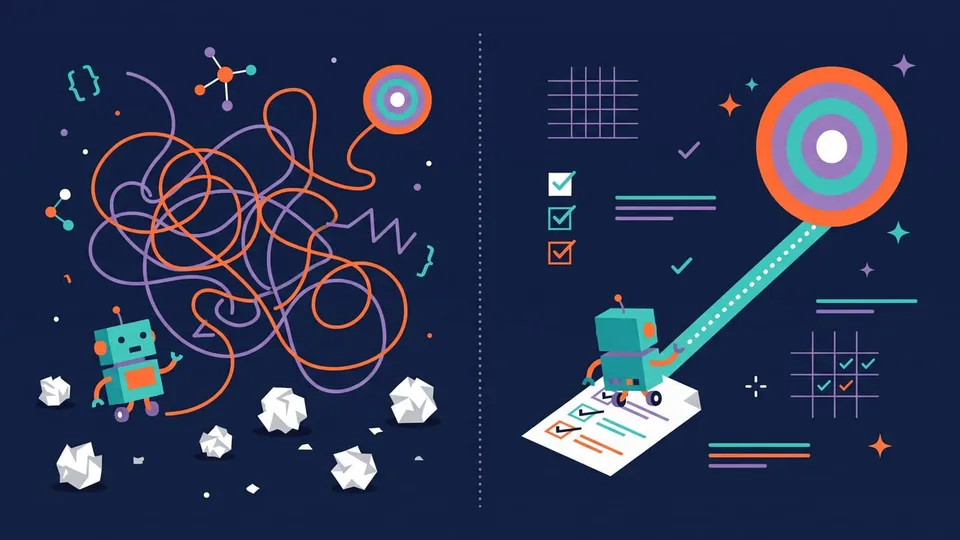
A spec moves those decisions to the beginning, when they're cheap to change. It also helps with the agent's main limit, the context window. In a long session, early instructions get lost or compacted, while a file in the repository stays there for a fresh session (or for you, three months later) to read again.
In practice, the agent asks about unclear points before coding instead of choosing for you, and you review a one-page document before you review a 900-line diff. The acceptance criteria tell the agent and the tests what "done" means. And the next person who touches the feature can see why it works the way it does.
The spec-driven development workflow
The tools use different names, but the workflow is almost always the same four steps, with a review at the end of each one:
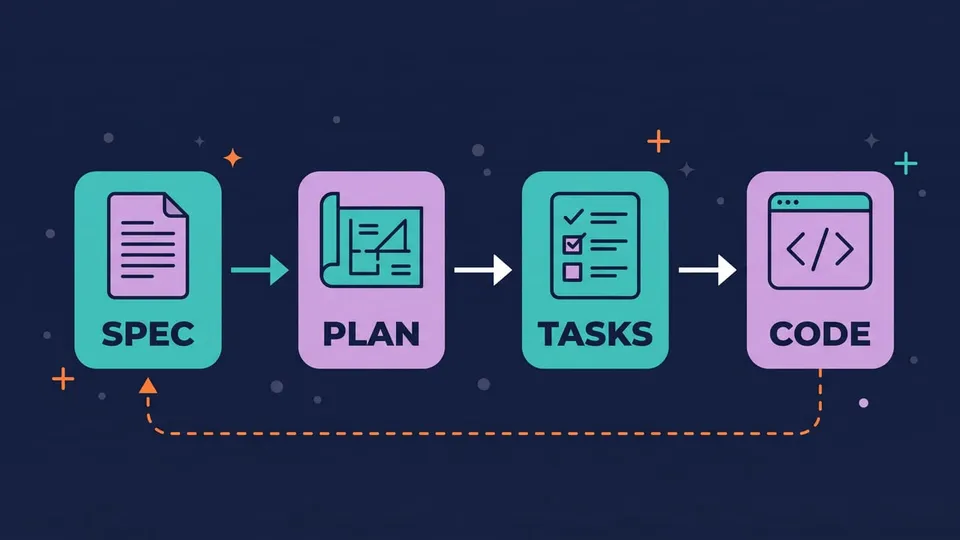
- Specify: describe what to build and why, from the user's point of view. No technology here.
- Plan: the agent reads the spec and the codebase and proposes the technical approach: files, data model, libraries, API changes.
- Tasks: the plan is broken into small tasks, in order, each one something you could review alone.
- Implement: the agent works through the tasks and checks the result against the spec's acceptance criteria.
Look at the dashed arrow: when you find something during implementation that the spec didn't cover, you fix the spec first and then the code. If you skip this, the spec stops matching the feature after a few changes.
What goes into a good spec?
A spec for an agent can be short, as long as it answers the questions the agent would otherwise guess. Here's an example for the CSV export from before:
# Spec: Export transactions to CSV

## Goal
Users want to open their transactions in a spreadsheet. Add an
"Export CSV" button to the transactions page.

## Requirements
- The export uses the filters currently applied on the page
  (date range, account, category).
- Columns, in this order: date, description, category, account, amount.
- Dates use ISO format (YYYY-MM-DD); amounts use a dot as decimal
  separator and no currency symbol.
- File name: transactions-YYYY-MM-DD.csv (the export date).
- Up to 100,000 rows. Above that, show an error asking the user
  to narrow the filters.

## Acceptance criteria
- WHEN the user clicks "Export CSV" with no filters
  THEN all their transactions are downloaded, newest first.
- WHEN a description contains a comma or quotes
  THEN the field is quoted and escaped (RFC 4180).
- WHEN the filtered list is empty
  THEN the file has only the header row.

## Out of scope
- Excel (.xlsx) export.
- Scheduled or emailed exports.

## Files and interfaces
- API: new endpoint GET /api/transactions/export (same query
  params as GET /api/transactions).
- UI: src/pages/transactions/TransactionsPage.tsx

## Verification
- Unit tests for the CSV builder (escaping, empty list, column order).
- An end-to-end test that applies a filter, exports, and checks the file.
A few things make this spec work:
- Specific values instead of adjectives. "Dates in ISO format" instead of "dates in a readable format".
- Testable acceptance criteria. The
WHEN ... THENstyle (Kiro uses a variant called EARS,WHEN ... THE SYSTEM SHALL ...) turns each line into a test case. - An "Out of scope" section. Agents like to do more than you asked for. Saying what not to build is as useful as saying what to build.
- A verification step. The Claude Code best practices recommend exactly this: the most useful specs name the files and interfaces involved, say what's out of scope and end with an end-to-end check that proves the feature works.
Tip: you don't have to write the spec alone. The agent is good at finding the questions you didn't think about. That's the first step of the next section.
Spec-driven development with Claude Code (no extra tools)
You don't need to install anything to try spec-driven development. Claude Code already has what you need: plan mode and a way to interview you.
1. Let the agent interview you
Start Claude Code in plan mode, so it can read your code but not change it:
claude --permission-mode plan
Inside a session, you can also press Shift+Tab until the status bar shows ⏸ plan mode on. Then use a prompt like the one from the official best practices:
I want to add CSV export to the transactions page. Interview me in detail
using the AskUserQuestion tool.

Ask about technical implementation, UI/UX, edge cases, concerns, and
tradeoffs. Don't ask obvious questions, dig into the hard parts I might
not have considered.

Keep interviewing until we've covered everything, then write a complete
spec to SPEC.md.
Claude reads the relevant code, asks you a series of multiple-choice questions (what about very large exports? which timezone for dates?) and writes SPEC.md at the end.
2. Review and edit the spec
Read SPEC.md like you would read a pull request. Cut what you don't want, add an "Out of scope" section if it's missing, and make the acceptance criteria concrete. This is the cheapest moment to change your mind.
3. Implement in a fresh session
Run /clear (or open a new session) and ask for the implementation. The new session starts with a clean context, focused on the spec:
Read SPEC.md and implement it. Start with a plan in plan mode. Write the
tests from the Verification section first, run them, and keep going until
they pass.
When Claude shows the plan, press Ctrl+G to open it in your editor and change it before approving.
4. Check the result against the spec
When it's done, ask for a review in a separate context, so the reviewer isn't the same agent that wrote the code:
Use a subagent to review the diff against SPEC.md. Check that every
requirement is implemented, every acceptance criterion has a test, and
nothing outside the spec changed. Report gaps, not style preferences.
If you do this often, turn the interview and the review into Claude Code skills, and use a Stop hook to run the tests before Claude can say it's done.
GitHub Spec Kit
Spec Kit is GitHub's open source toolkit for spec-driven development (MIT license, more than 140k stars). It reached version 1.0 in August 2026, and the latest release is 1.2.3, from October 22, 2026. It works with Claude Code, GitHub Copilot, Codex, Cursor, Gemini CLI and many other agents.
How to install Spec Kit
You need Python 3.11+ and uv. Install the specify CLI and create a project for Claude Code:
uv tool install specify-cli
specify init my-project --integration claude
cd my-project
To add it to an existing project, run specify init . --integration claude inside it. In scripts or CI, add --non-interactive, or the command waits for input.
Note: I tested it on Windows with the same package installed by pip in a Python virtual environment, and it worked the same way. The --script option chooses the helper scripts: sh, ps (PowerShell) or py.
With the Claude integration, specify init installs the commands as Claude Code skills in .claude/skills/speckit-*, plus a .specify/ folder with the templates, scripts and the project constitution (.specify/memory/constitution.md).
The Spec Kit workflow
You run these commands in the agent's chat, not in the terminal, one at a time, reviewing the result of each one:
/speckit-constitution Principles: TypeScript strict mode, tests for every feature, no new dependencies without a reason.
/speckit-specify Let users export their filtered transactions to a CSV file.
/speckit-clarify
/speckit-plan Use the existing Express API and the papaparse library. No database changes.
/speckit-tasks
/speckit-analyze
/speckit-implement
/speckit-converge
What each one does:
/speckit-constitution: writes the project principles that every later step must follow. You do this once per project./speckit-specify: creates the spec from your description, in a numbered folder, likespecs/001-export-transactions-csv/spec.md. The template has prioritized user stories withGiven/When/Thenscenarios, functional requirements (FR-001: System MUST ...), success criteria, and[NEEDS CLARIFICATION]markers where your description wasn't enough./speckit-clarify(optional, before the plan): asks up to five questions about gaps in the spec and writes the answers into it./speckit-plan: createsplan.mdwith the technical approach. This is where the tech stack goes./speckit-tasks: breaks the plan into ordered tasks intasks.md./speckit-analyze(optional, before implementing): a read-only report of inconsistencies between spec, plan and tasks./speckit-implement: works through the tasks./speckit-converge: compares the code with the spec, plan and tasks, and adds the missing work totasks.md(it never edits code). You repeat implement and converge until it reportsConverged.
There's also /speckit-checklist, which generates checklists to test the quality of the requirements themselves. The command names change a little per agent: in Copilot it's also /speckit-specify, in Codex it's $speckit-specify.
OpenSpec
OpenSpec is a lighter alternative (MIT, about 73k stars, version 1.15.0 from October 24, 2026). Its own README says it's "fluid not rigid" and "built for brownfield not just greenfield": instead of a spec per feature, you keep a set of specs that describe how the system works today, and each change is a proposal that updates them.
How to install OpenSpec
Since version 1.15.0 it has a standalone installer that doesn't need Node.js. On Windows, in PowerShell:
irm https://raw.githubusercontent.com/Fission-AI/OpenSpec/main/scripts/binary/install.ps1 | iex
On macOS and Linux:
curl -fsSL https://raw.githubusercontent.com/Fission-AI/OpenSpec/main/scripts/binary/install.sh | sh
Or with npm (Node.js 20.19.0+): npm install -g @fission-ai/openspec@latest. Then, in your project:
openspec init --tools claude
This creates the openspec/ folder (specs/ for the current specs, changes/ for proposals) and adds the /opsx:* commands and skills to .claude/.
Note: OpenSpec collects anonymous usage stats (command names and version only). To turn it off, set OPENSPEC_TELEMETRY=0.
The OpenSpec workflow
/opsx:explore
/opsx:propose add-csv-export
/opsx:apply
/opsx:archive
/opsx:explore: a conversation where the agent reads your code and helps you decide what to build. Use it when you aren't sure yet./opsx:propose: createsopenspec/changes/add-csv-export/withproposal.md(why and what),specs/(the requirement changes),design.md(technical approach) andtasks.md./opsx:apply: implements the tasks./opsx:archive: merges the change's specs intoopenspec/specs/and moves the change to the archive.
The specs are plain Markdown with SHALL requirements and WHEN/THEN scenarios:
## ADDED Requirements
### Requirement: CSV export
The app SHALL let users export the filtered transactions to a CSV file.

#### Scenario: Export with filters
- **WHEN** the user filters by account and clicks "Export CSV"
- **THEN** the file contains only the transactions of that account
Kiro specs
Kiro is an agentic IDE from AWS (there's also a Kiro CLI and a web version) built around spec-driven development. Specs are part of the editor: you create one from the Specs panel or the chat, and Kiro generates three files in .kiro/specs/:
requirements.md: user stories and acceptance criteria in EARS format (WHEN a user submits an email that already exists THE SYSTEM SHALL display "Email already registered" error);design.md: architecture, sequence diagrams, error handling and testing strategy;tasks.md: the implementation tasks.
You approve each file before Kiro moves on. It also has Bugfix Specs (a bugfix.md with the bug analysis instead of requirements), a Design-First variant, and Quick Spec, which generates the three files in one pass without the approval steps. When you run all the tasks, Kiro groups them by dependency and runs independent tasks in parallel.
Kiro has a free plan with 50 credits a month, and paid plans start at $20/month (Pro, 1,000 credits). It works with Claude, GPT and open weight models.
Spec Kit vs OpenSpec vs Kiro
| Spec Kit | OpenSpec | Kiro | |
|---|---|---|---|
| What it is | CLI + templates for your agent | CLI + commands for your agent | IDE (and CLI) with specs built in |
| Made by | GitHub | Fission AI | AWS |
| Price | Free, open source (MIT) | Free, open source (MIT) | Free plan; paid from $20/month |
| Works with | Claude Code, Copilot, Codex, Cursor and many more | 30+ tools, Claude Code included | Kiro itself |
| Requires | Python 3.11+ and uv | Nothing (standalone) or Node.js | Kiro account |
| Files | specs/NNN-feature/: spec.md, plan.md, tasks.md | openspec/changes/name/: proposal.md, specs/, design.md, tasks.md | .kiro/specs/: requirements.md, design.md, tasks.md |
| Best for | New features and projects where you want every step reviewed | Existing codebases and small, frequent changes | People who want specs inside the editor, with no setup |
If you already use Claude Code and want to try this, I'd start with the plan mode workflow above. When you feel you're writing the same spec structure again and again, try OpenSpec for its light setup, or Spec Kit if you want more structure and checks.
Spec-driven development vs vibe coding: when is it worth it?
Spec-driven development has critics, and some of the criticism is fair.
The most common one is that it feels like waterfall: requirements, then design, then tasks, all before any code, like the processes agile replaced. The scale is very different, though. A spec here covers one feature and takes minutes to write.
The second is the amount of Markdown. Böckeler tested the tools and saw Kiro turn a small bug into four user stories with 16 acceptance criteria, and Spec Kit generate long, repetitive files that were tedious to review. If reviewing the spec takes longer than reviewing the code, the process is too heavy for that task.
And the agent can still ignore the spec. It makes a good result more likely, but you still need tests and a review.
So use it where it pays off:
- Use a spec for features that touch several files, that have business rules or edge cases, or that someone else will maintain.
- Skip the spec for small fixes you can describe in one sentence, and for prototypes where you don't know yet what you want. In that case, build something rough, look at it, and write the spec once you know.
FAQ
Is spec-driven development the same as test-driven development?
No, but they work well together. TDD starts from tests for small units of code; SDD starts from a description of a feature's behavior. The acceptance criteria in a good spec are a natural source of tests, so many people write those tests first and let the agent make them pass.
Do I need Spec Kit to do spec-driven development?
No. A Markdown file in the repository and an agent with a plan mode are enough. Spec Kit, OpenSpec and Kiro add templates, commands and checks on top of the same idea.
Does Spec Kit work with Claude Code?
Yes. Run specify init . --integration claude in your project, and the commands show up as skills: /speckit-specify, /speckit-plan, /speckit-tasks, /speckit-implement and the others.
Should I commit the specs to Git?
Yes. The spec is useful exactly because it outlives the chat session: it documents why the feature works the way it does, and the next session (or the next developer) can read it. All three tools keep the specs as Markdown files in the repository.
Conclusion
Spec-driven development is a simple idea: decide what you want, write it down, and make the agent work from that document. With AI coding agents it saves time, because wrong guesses get fixed in a one-page spec instead of in a big diff.
You can start today with Claude Code's plan mode and a SPEC.md. If you like the workflow, Spec Kit and OpenSpec add structure on top of the agent you already use, and Kiro gives you the same thing inside an IDE. Just keep the spec the size of the task.
Links
- GitHub Spec Kit and its documentation
- OpenSpec and its documentation
- Kiro specs documentation
- Claude Code best practices
- Understanding Spec-Driven-Development: Kiro, spec-kit, and Tessl, by Birgitta Böckeler
Tags: ai|claude-code|productivity