
What Is MCP? MCP vs API Explained for Developers

Every AI coding tool now has a settings page for "MCP servers", and every SaaS product seems to be launching one. If you've been nodding along without being sure what it is (or why it isn't just an API), this post is for you. I will explain what MCP is, how it works under the hood, what an MCP server is, and the difference between MCP and an API. The short answer: MCP (Model Context Protocol) is an open standard for connecting AI applications to external tools and data. An app that speaks MCP can plug into any MCP server (GitHub, a database, your file system) without custom integration code, and the model sees each server's tools with a description and an input schema, so it can decide on its own when to call them. An API is made for your code; MCP is made for AI applications, and an MCP server usually calls an API underneath.
Note: Everything here was checked against the official MCP docs and the 2026-07-28 specification on November 10, 2026. The commands were run with Node.js 24.21 on Windows 11.
What is MCP in AI?
MCP stands for Model Context Protocol. The official docs define it as "an open-source standard for connecting AI applications to external systems", and compare it to a USB-C port: one standard plug, so any AI app can connect to any tool that implements it.
The word that matters in the name is "context". A language model only knows what it learned in training plus what's in the conversation. MCP is a standard way to bring more into that conversation: data (files, database rows, tickets) and actions (run a query, open a pull request, send a message).
A short history:
- November 2024: Anthropic open-sourced MCP, with SDKs and a set of reference servers.
- December 2025: Anthropic donated MCP to the Agentic AI Foundation, a fund under the Linux Foundation co-founded by Anthropic, Block and OpenAI. By then there were more than 10,000 active public MCP servers, and ChatGPT, Cursor, Gemini, Microsoft Copilot and VS Code all supported it.
- July 2026: the 2026-07-28 specification made the protocol stateless (more on that below).
So even though Anthropic created it, MCP is now governed outside any single company, and its competitors' tools support it too.
What problem does MCP solve?
Before MCP, if you wanted an AI app to read your GitHub issues, you wrote a GitHub integration for that app. Another AI app needed its own GitHub integration. Add Slack, Postgres and Jira, and you have every app wired to every tool, each one done a little differently. Anthropic's announcement puts it like this: "Every new data source requires its own custom implementation, making truly connected systems difficult to scale."
MCP turns that many-to-many mess into one-to-many. A tool vendor builds one MCP server, and it works in every app that speaks MCP. An app adds MCP support once and gets access to every MCP server.
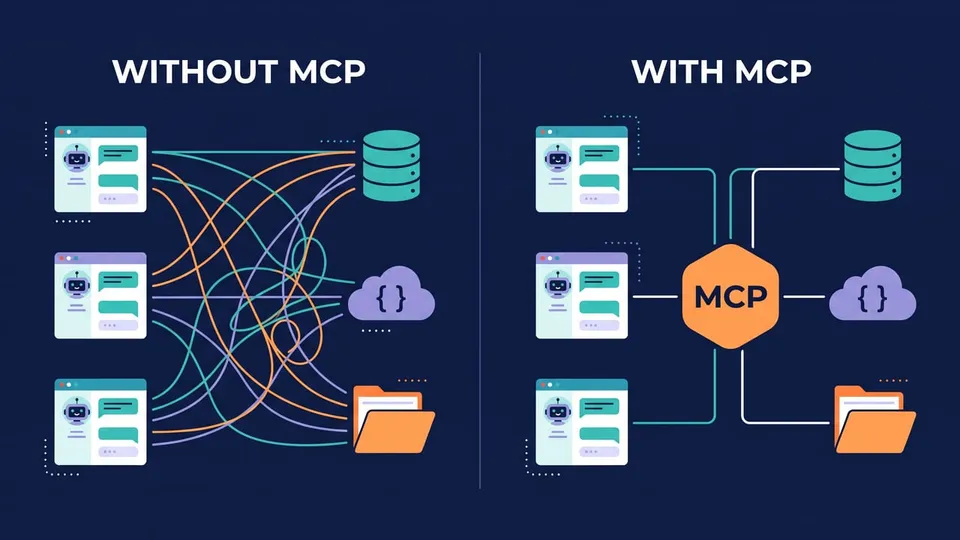
The spec says MCP takes some inspiration from the Language Server Protocol, which did the same for code editors: before LSP, every editor needed its own plugin for every programming language.
How does MCP work?
MCP has three participants, and the names confuse a lot of people at first:
- MCP host: the AI application you use, like Claude Code, VS Code, Cursor or ChatGPT.
- MCP client: a component inside the host that keeps a connection to one MCP server. The host creates one client per server.
- MCP server: a program that gives the host context: tools, data and prompts.
For example, when VS Code connects to a GitHub MCP server and a file system MCP server, it creates two MCP clients, one for each.
Tools, resources and prompts
An MCP server can offer three kinds of things, called primitives:
| Primitive | What it is | Who decides to use it | Example |
|---|---|---|---|
| Tools | Functions the model can call to do something | The model | Query a database, create an issue |
| Resources | Data the app can read and add as context | The application | A file, a database schema |
| Prompts | Reusable message templates | The user (slash command, menu) | "Review this pull request" |
Tools are the ones you'll see most. When people say "the agent used the GitHub MCP", it usually means the model called a tool from the GitHub MCP server.
Discovery: the model learns what's available
The client asks the server what it offers with a tools/list request, and the server answers with each tool's name, a description in plain English and a JSON Schema of its inputs. The host merges the tools from all its servers into one list and gives it to the model. When the model decides to use one, the host sends a tools/call request to the right server and puts the result back into the conversation.
Under the hood, the messages are JSON-RPC 2.0, and they travel over one of two transports:
- stdio: the host starts the server as a local process and talks to it through stdin and stdout. This is a "local" MCP server.
- Streamable HTTP: the server runs as a web endpoint, and many clients connect to it over the network. This is a "remote" MCP server, and it's where authentication comes in (the spec recommends OAuth).
What changed in the 2026-07-28 spec
Note: If you read about MCP before mid-2026, some details changed. The 2026-07-28 spec retired the initialize handshake and the Mcp-Session-Id header. Now every request carries the protocol version, client info and capabilities on its own, so any server instance behind a plain load balancer can answer it. There's an optional server/discover request to ask a server what it supports. Sampling, roots and logging were deprecated (they still work for at least twelve months), and so was the old HTTP+SSE transport.
For you as a user, little changes. For people running remote servers, it means MCP servers now scale like any stateless HTTP API.
What is an MCP server?
An MCP server is a program that exposes tools, resources and prompts through MCP. It can be a small Node.js or Python script on your machine, or a service run by a company on its own infrastructure. Some examples:
- the official file system server, which lets the model read and write files in folders you allow;
- a database server, which lets the model query tables and read the schema;
- remote servers from vendors like GitHub, Sentry or Notion, which you connect to with a URL and log into with OAuth.
Let's see one in practice. The MCP Inspector is the official tool to test servers, and its CLI mode prints the raw responses. This command starts the file system server (allowing only the current folder) and asks for its tool list:
npx @modelcontextprotocol/inspector --cli npx -y @modelcontextprotocol/server-filesystem . --method tools/list
I ran it in a folder with a README.md, a package.json and a src folder, and got 16 tools back. Here is one of them, exactly as the model sees it:
{
  "name": "list_directory",
  "title": "List Directory",
  "description": "Get a detailed listing of all files and directories in a specified path. Results clearly distinguish between files and directories with [FILE] and [DIR] prefixes. This tool is essential for understanding directory structure and finding specific files within a directory. Only works within allowed directories.",
  "inputSchema": {
    "type": "object",
    "properties": {
      "path": {
        "type": "string"
      }
    },
    "required": ["path"]
  },
  "annotations": {
    "readOnlyHint": true,
    "destructiveHint": false,
    "idempotentHint": true,
    "openWorldHint": false
  }
}
(I removed the $schema and outputSchema fields to keep it short.)
Look at the description: it's written for the model to read, and it says what the tool does and when to use it. The annotations are hints for the host, for example, that this tool only reads and doesn't change anything. The spec says hosts should treat these hints as untrusted unless the server is trusted.
Now let's call it, like a host would:
npx @modelcontextprotocol/inspector --cli npx -y @modelcontextprotocol/server-filesystem . --method tools/call --tool-name list_directory --tool-arg path=.
{
  "content": [
    {
      "type": "text",
      "text": "[FILE] package.json\n[FILE] README.md\n[DIR] src"
    }
  ],
  "structuredContent": {
    "content": "[FILE] package.json\n[FILE] README.md\n[DIR] src"
  }
}
The result comes back as content blocks, which the host puts into the conversation for the model to read. If you want to build a server like this one yourself, I wrote a step-by-step guide on how to build an MCP server in TypeScript.
MCP vs API: what's the difference?
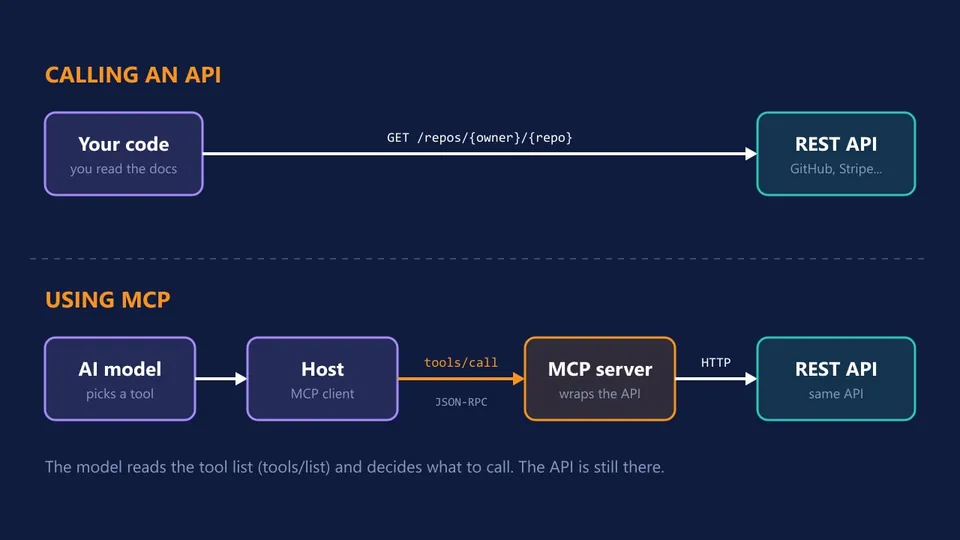
An API (REST, GraphQL, gRPC) is an interface for programs. A developer reads the docs, learns the endpoints and writes code that calls them. MCP is a protocol for AI applications, and the main difference is who decides what to call:
- With an API, you decide. The call is in your code, written in advance.
- With MCP, the model decides at runtime. It reads the tool list and descriptions, and picks a tool based on what the user asked.
Side by side:
| API | MCP | |
|---|---|---|
| Made for | Developers writing code | AI applications and their models |
| Who picks the call | Your code, written in advance | The model, at runtime |
| How you learn what's available | Reading docs (or an OpenAPI spec) | tools/list at runtime, with descriptions and schemas |
| Interface | Different for every API (endpoints, auth, formats) | The same for every server (JSON-RPC methods) |
| Granularity | Often low-level endpoints | Usually task-level tools ("search issues") |
| Typical transport | HTTP | stdio (local) or Streamable HTTP (remote) |
| Who runs it | The service provider | The provider or you, usually as a wrapper over an API |
MCP doesn't replace APIs
The table may make them look like rivals, but in practice one sits on top of the other. Most MCP servers are thin wrappers around an API. The GitHub MCP server calls the GitHub API, and the server from my TypeScript tutorial calls the npm registry API. You can see the API side with a plain curl, no AI involved:
curl https://api.github.com/repos/modelcontextprotocol/servers
Your code calls this endpoint because you read the GitHub docs and know it exists. An MCP server would wrap a call like that in a tool such as "get repository info", with a description the model can understand, and the model would call it when you ask "how many stars does the MCP servers repo have?".
In most cases you won't choose between them. The API keeps doing the work, and MCP lets an AI application find and use it without anyone writing integration code for that specific app.
When to use MCP and when to call the API directly
- Your own code needs the data (a backend job, a script, a web app): call the API. It's faster, cheaper and predictable. There's no model in the loop, and you don't need one.
- An AI assistant or agent should use the service (Claude Code, Cursor, ChatGPT, your own agent): use or build an MCP server. You write it once, and it works in every host.
- You're building one AI feature with a fixed set of functions in your own app: plain function calling (next section) may be enough, without running a separate server.
MCP vs function calling (tool use)
Function calling, also called tool use, is a feature of the model API. You send the tool definitions (name, description and input schema) with your request, the model answers with a structured call, your code runs it and sends the result back. The Claude tool use docs show the full round trip.
MCP builds on top of that and standardizes where the tools come from. The host gets tool definitions from MCP servers with tools/list, passes them to the model through function calling, and when the model calls one, routes the call to the right server with tools/call. Without MCP, the tools live inside your app's code. With MCP, they live in separate servers that any host can plug in.
MCP vs A2A, RAG and skills
A few other terms show up next to MCP all the time. Here is how they relate.
MCP vs A2A
A2A (Agent2Agent) is a protocol originally created by Google and now hosted by the Linux Foundation, for agents to discover and talk to other agents. MCP connects an agent to tools and data. They're complementary: an agent can use MCP for its tools and A2A to hand off work to another team's agent.
MCP vs RAG
RAG (retrieval-augmented generation) is a technique: search a knowledge base for relevant text and add it to the prompt before the model answers. MCP is a protocol, and the two fit together: an MCP server can be the retrieval part, with a search tool or resources the host pulls into context.
MCP vs skills
Skills (from the Agent Skills open standard, used by Claude Code and other tools) are folders with a SKILL.md file of instructions. An MCP server gives the model new capabilities (access to a system). A skill gives it knowledge and a procedure (how your team does something). They work well together, and the line got thinner in 2026: the Skills extension (SEP-2640) lets an MCP server ship skills alongside its tools. I explain how to write one in Claude Code skills.
Is MCP safe?
MCP is a protocol, so it's as safe as the servers you connect and the permissions you give them. A few things to keep in mind:
- A local MCP server is code running on your machine, with your user's permissions. Installing one is like installing any npm package: check who publishes it. The official security best practices list "arbitrary code execution" as the first risk of an untrusted local server.
- Prompt injection. Tool results go straight into the model's context. A server that fetches web pages, emails or issues can bring in text written to manipulate the model. The Claude Code docs warn: "Verify you trust each server before connecting it."
- Least privilege. Give a server a read-only token when it only needs to read, and limit the folders a file system server can see.
- Approve actions. Most hosts ask before running a tool. Read what the tool will do before you approve it, especially for tools that write or delete.
How to start using MCP
You don't need to write any code to use MCP. Most hosts have a command or a JSON file to add a server. In Claude Code, for example, adding a remote server is one command:
claude mcp add --transport http notion https://mcp.notion.com/mcp
For a local server, you pass the command that starts it after --:
claude mcp add filesystem -- npx -y @modelcontextprotocol/server-filesystem .
Then type /mcp inside Claude Code to see the servers and their tools. VS Code and Cursor use an mcp.json file instead; I show both formats in the MCP server tutorial.
To find servers, the official MCP Registry and the reference servers repo are good places to start.
FAQ
What does MCP stand for?
MCP stands for Model Context Protocol. "Model" is the AI model, "context" is the information and actions you give it, and "protocol" means it's a standard set of messages, like HTTP, that any app and server can implement.
Is MCP an API?
Not in the usual sense. MCP is a protocol that defines how AI applications talk to servers, while an API is the interface of a specific service. An MCP server exposes its tools through the protocol, and usually calls one or more APIs underneath.
Will MCP replace REST APIs?
No. Apps, backends and scripts will keep calling REST APIs directly, because they don't need a model to decide what to call. MCP adds a layer on top so AI applications can use those APIs too.
Is MCP only for Claude?
No. Anthropic created it, but it's now an open standard under the Linux Foundation, supported by ChatGPT, Gemini, VS Code with Copilot, Cursor and many other tools. The same server works in all of them.
What's the difference between an MCP client and an MCP server?
The client lives inside the AI application (the host) and opens the connection. The server is the program that offers the tools and data. One host can have many clients, one per server it connects to.
Conclusion
MCP is a standard plug between AI applications and the outside world. The host (your AI app) creates a client for each MCP server, the server lists its tools with descriptions and schemas, and the model decides when to call them. It doesn't replace APIs: most MCP servers wrap one, and your regular code should keep calling APIs directly. Where MCP pays off is when you want an AI tool to use a service, because a server written once works in every host.
If you want to see the server side from the inside, the next step is to build your own MCP server.
See you next time!
Links
- What is the Model Context Protocol?
- MCP architecture overview
- MCP specification
- The 2026-07-28 specification
- Introducing the Model Context Protocol (Anthropic)
- MCP joins the Agentic AI Foundation (Anthropic)
- MCP security best practices
- MCP reference servers
- MCP Inspector
- Claude: Tool use (function calling)
- Claude Code: Connect to tools via MCP
Tags: ai|claude-code