
OpenCode vs Claude Code: Which Terminal Agent to Use?

Claude Code made the terminal coding agent popular, and OpenCode is the open source agent that a lot of developers now put next to it. In this post I will compare OpenCode vs Claude Code: what each one is, which models they run, how much they cost, how they handle permissions and how to install them, so you can decide which one to use. The short answer: Claude Code is Anthropic's agent, works only with Claude models and comes with a Claude subscription. OpenCode is free and open source (MIT), and works with almost any model: Claude through an API key, GPT, Gemini, open models like GLM or Kimi, or local models through Ollama. Pick Claude Code if you want the best results on hard tasks for a flat monthly price; pick OpenCode if you want to choose (and switch) the model yourself.
Important! Both tools change every week, and OpenCode had a major version recently (OpenCode 2, first tagged in September 2026). Everything here was checked against the official docs on October 23, 2026, with OpenCode 2.1.4 and Claude Code 2.1.309 (installed and tested on Windows 11). Many comparisons out there describe OpenCode 1 and still say you can log in with your Claude Pro plan or that OpenCode reads your CLAUDE.md. Neither is true anymore.
What is OpenCode?
OpenCode is an open source AI coding agent. You describe a task, and it reads your code, edits files and runs commands, the same loop as Claude Code. It's made by Anomaly, the team behind SST and Models.dev (the repository moved from sst/opencode to anomalyco/opencode). It's written in TypeScript, has an MIT license and about 220k stars on GitHub.
You can use it in three ways:
- Terminal (TUI): the
opencodecommand. - Desktop app: in beta, for macOS, Windows and Linux.
- Web:
opencode pairprints a one-time link that opens the interface in your browser.
The main idea of OpenCode is that it isn't tied to a model provider. You run /connect inside it, choose a provider (Anthropic, OpenAI, Google, GitHub Copilot, OpenRouter and many others from the Models.dev catalog), paste the credentials, and pick a model with /models.
cd my-project
opencode
It comes with two primary agents that you switch with Tab: build, the default one with full access, and plan, which can't edit your project files and is meant for analysis before you change anything.
What is Claude Code?
Claude Code is Anthropic's agentic coding tool. It runs in the terminal, in VS Code (also in Cursor) and JetBrains IDEs, in a desktop app, on the web at claude.ai/code and in the Claude mobile app.
cd my-project
claude
It uses Claude models: on paid plans the default is Claude Opus 5.5, and you can switch to Sonnet 5.5, Haiku 5.5 or Fable 5.1 with /model. It isn't open source. You sign in with your Claude account (Pro, Max, Team or Enterprise) or use an API key, and Amazon Bedrock, Google Cloud and Microsoft Foundry work too.
I already compared it with two other tools: an AI editor in Cursor vs Claude Code and OpenAI's agent in Codex vs Claude Code. OpenCode is the closest of the three to Claude Code in how you use it.
OpenCode vs Claude Code: side-by-side comparison
| OpenCode | Claude Code | |
|---|---|---|
| Made by | Anomaly (the SST team) | Anthropic |
| Open source | Yes (MIT) | No |
| Where it runs | Terminal, desktop app (beta), web | Terminal, IDE extensions, desktop app, web, mobile |
| Models | Almost any: Claude, GPT, Gemini, GLM, Kimi, Qwen, DeepSeek, local models | Claude only (Opus, Sonnet, Haiku, Fable) |
| Uses your Claude Pro/Max plan | No (Claude needs an API key or Zen) | Yes |
| Price of the tool | Free; you pay for the models | Comes with Claude plans from $20/month |
| Default permissions | Allows almost everything; asks before reading .env | Auto mode: a classifier reviews each action |
| Project instructions | AGENTS.md only | CLAUDE.md (reads AGENTS.md when there's no CLAUDE.md) |
| Extensibility | MCP, skills, custom agents, commands, plugins | MCP, skills, subagents, commands, hooks, plugins, Agent SDK |
The main difference: one provider vs any provider
For most people, this difference decides the choice.
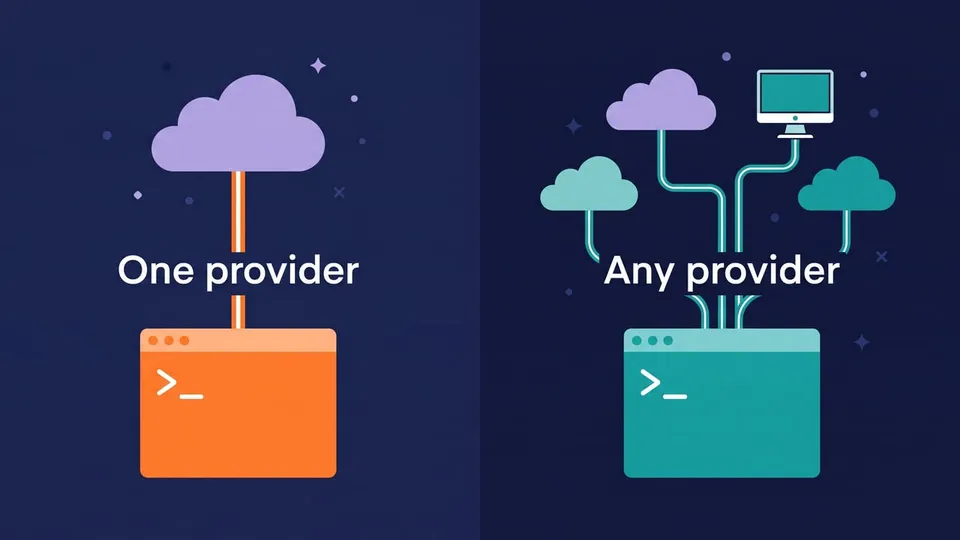
Claude Code is built around Claude models. Anthropic tunes the tool and the models together, and a subscription gives you a lot of usage for a fixed price. Technically you can point it to another endpoint with ANTHROPIC_BASE_URL (OpenCode's own console even documents how to use its models inside Claude Code), but that's not how most people use it.
OpenCode treats the model as a setting. You can use:
- API keys from Anthropic, OpenAI, Google, OpenRouter and other providers;
- your GitHub Copilot subscription (it signs in with GitHub's device flow);
- local models: OpenCode finds Ollama at
127.0.0.1:11434on its own, and also LM Studio and vLLM; - OpenCode Zen or OpenCode Go, its own paid gateways (more on them below).
You can even choose the model per run. opencode run takes --model in the provider/model format:
opencode run --model anthropic/claude-sonnet-5-5 "explain what src/libs/posts.ts does"
Can I use my Claude Pro or Max subscription in OpenCode?
No, and many older posts get this wrong. Anthropic's legal and compliance page says the OAuth login of Claude plans is "designed to support ordinary use of Claude Code and other native Anthropic applications", and that Anthropic "does not permit third-party developers to offer Claude.ai login into their own applications". Anthropic started blocking these logins in third-party tools in January 2026, and OpenCode removed its Claude subscription plugin in version 1.3.0.
So, in OpenCode, Claude models come from an Anthropic API key (pay per token) or from OpenCode Zen. Plugins that bring the subscription login back go against Anthropic's terms and can get your account banned.
Note: this is also why the cost comparison isn't simple. With Claude Code, a $20 plan covers a lot of Opus and Sonnet usage. The same work through an API key in OpenCode is billed per token and can cost more.
Is OpenCode free? OpenCode pricing vs Claude Code pricing
OpenCode itself is free. What costs money is the model behind it, and there are four ways to pay for it:
- Your own API keys: you pay the provider directly, per token.
- Subscriptions you already have: GitHub Copilot works in OpenCode.
- OpenCode Zen: pay as you go. You add a $20 balance (plus a $1.23 card processing fee), and OpenCode says it charges per request "with zero markups". It has the big models: Claude Opus 5.5 and Sonnet 5.5, GPT 6.1 Sol, Gemini and others.
- OpenCode Go: a subscription for open models such as GLM-5.3, Kimi K3, DeepSeek V4 Pro and Qwen3.8 Max (Claude Haiku 5.5 and GPT 6 Luna are included too). Go costs $10/month and Go Plus $40/month. Limits are a dollar allowance per month, and you can use at most 20% of it in any five-hour window and 50% in a week.
Some models on Zen and Go are free for a limited time, and local models through Ollama cost nothing but your hardware.
Claude Code comes with Claude plans (prices from October 23, 2026, in US dollars):
| Plan | Price | Claude Code |
|---|---|---|
| Free | $0 | No |
| Pro | $20/month ($17/month billed yearly) | Yes |
| Max 5x / Max 20x | $100 / $200 per month | Yes, with higher limits |
| Team | $25/seat ($20 yearly); Premium seat $125 ($100 yearly) | Yes |
| API (Claude Console) | Pay per token | Yes |
In short: if you'll use Claude models anyway, Claude Code with a subscription is usually the cheaper route. If you're fine with open models, OpenCode Go at $10/month or a local model is the cheapest way to have an agent in the terminal.
Which one is better at coding?
Artificial Analysis runs both agents on the same tasks. This is the main comparison on their page as of October 23, 2026:
| Claude Code (Opus 5.5, max) | OpenCode (GLM-5.3) | |
|---|---|---|
| Coding Agent Index | 62 | 49 |
| FrontierCode v1.1 | 56% | 48% |
| Terminal-Bench 4.0 | 63% | 40% |
| SWE-Atlas-QnA | 66% | 59% |
| Cost per task (API prices) | $11.42 | $5.23 |
| Time per task | 1.0 h | 56.2 min |
Read this table with care. It compares two different models as much as two tools: Claude Code with Anthropic's top model against OpenCode with an open model that costs much less per token. The same page also ran Claude Code with non-Claude models, and it scored 39 with Qwen3.8 Max and 43 with Step 5 Preview, below OpenCode with GLM-5.3. So most of the gap comes from the model.
What this means in practice:
- With Claude Code you get the strongest result on hard, long tasks today, at a higher price per task (which a subscription hides).
- With OpenCode you get about half the API cost per task with an open model, and you're free to pay for a stronger one when the task needs it.
Permissions and safety
Both agents run commands on your machine, and they protect you in different ways.
Claude Code has permission modes that you cycle with Shift + Tab: Manual (asks before edits and commands), acceptEdits, plan, auto, dontAsk and bypassPermissions. Since version 2.1.283, terminal and VS Code sessions start in auto mode, where a classifier model reviews each action before it runs. You can also turn on a sandbox with /sandbox.
OpenCode has permission rules, and its default is open: every agent starts with a policy that allows everything, except reading .env files, which asks first. It doesn't ask before editing files outside the project either. Its docs are direct about it: "shell runs with the host user's filesystem, process, and network authority". There's no sandbox.
You tighten it in opencode.jsonc, with ordered rules where the last match wins. This is the example from the permissions docs:
{
  "$schema": "https://opencode.ai/config.json",
  "permissions": [
    { "action": "shell", "resource": "*", "effect": "ask" },
    { "action": "shell", "resource": "git status *", "effect": "allow" },
    { "action": "shell", "resource": "git diff *", "effect": "allow" },
    { "action": "shell", "resource": "git push *", "effect": "deny" },
  ],
}
It asks before any shell command, allows git status and git diff without asking, and never lets the agent push.
Tip: whatever tool you use, work in a Git repository and commit before a big task. Then git diff shows exactly what the agent changed, and undoing it is one command.
AGENTS.md vs CLAUDE.md, skills and MCP
Both agents read a Markdown file with your project's instructions, and OpenCode 2 changed which file that is.
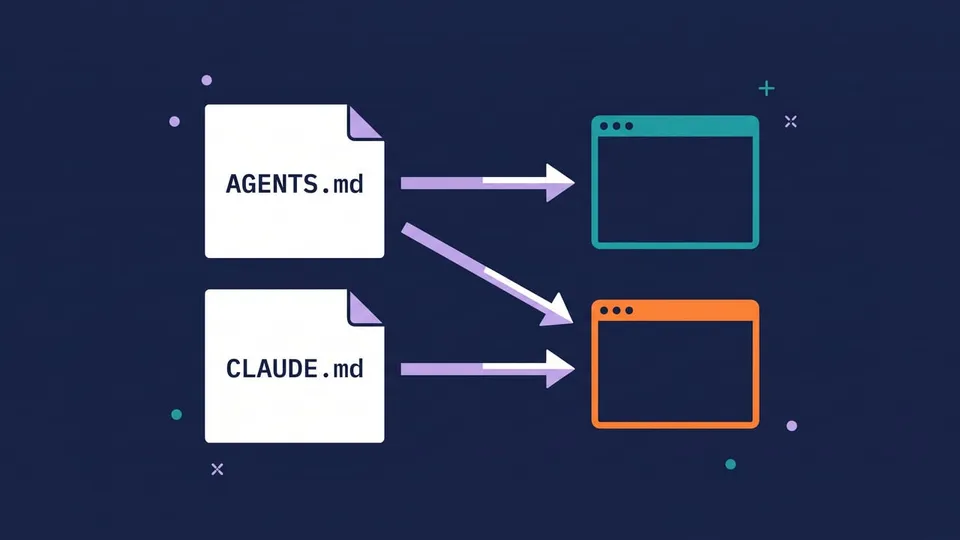
- OpenCode reads
AGENTS.mdonly. Its docs say: "OpenCode V2 recognizes AGENTS.md only. It does not use CLAUDE.md as a fallback." The global file lives in~/.config/opencode/AGENTS.md. - Claude Code reads
CLAUDE.md, and since version 2.1.277 it readsAGENTS.mdwhen the repository has noCLAUDE.md.
So if you want to use both on the same repository, keep the instructions in AGENTS.md. Claude Code reads it, OpenCode reads it, and you don't keep two files in sync. If you already have a CLAUDE.md, you can import the other file from it with a line containing @AGENTS.md.
Skills are easier: OpenCode looks for skills in .opencode/skills, and also in .claude/skills and .agents/skills. So the skills you wrote for Claude Code (I show how in Claude Code Skills: How to Create Your Own) work in OpenCode without changes.
MCP servers work in both, so a server you build once (like the one in How to Build an MCP Server in TypeScript) plugs into either agent. Each one has its own config format: claude mcp add in Claude Code, the opencode mcp command or the config file in OpenCode.
Claude Code has more ways to automate itself today: hooks that run commands at fixed points of a session, plugins and the Agent SDK. OpenCode has custom agents (Markdown files in .opencode/agents/), commands and a plugin API, which changed in version 2, so V1 plugins have to be ported.
How to install OpenCode and Claude Code
Install OpenCode
On macOS or Linux:
curl -fsSL https://opencode.ai/v2/install | bash
With Homebrew:
brew install anomalyco/tap/opencode-v2
With npm, on any OS (including Windows):
npm install -g @opencode/cli
The package name changed in version 2: it's @opencode/cli now (the old opencode-ai package is still OpenCode 1). The docs say Windows package managers aren't supported, so on Windows you use npm or download the standalone binary from the docs.
Note: when I installed it on Windows 11 with npm 12.2, the install finished, but opencode failed with this error:
Error: @opencode/cli's postinstall script was not run.
Recent npm versions don't run install scripts unless you allow them, and OpenCode uses one to pick the right binary for your system. Allow it for this package:
npm install -g --allow-scripts=@opencode/cli @opencode/cli
opencode --version
opencode v2.1.4
Then run opencode in your project, type /connect and choose a provider.
Install Claude Code
On macOS, Linux or WSL:
curl -fsSL https://claude.ai/install.sh | bash
On Windows, in PowerShell:
irm https://claude.ai/install.ps1 | iex
Run claude in your project and sign in with your Claude account on the first run. On native Windows, it's a good idea to have Git for Windows installed, so Claude Code can use Bash.
OpenCode vs Claude Code commands
| Task | OpenCode | Claude Code |
|---|---|---|
| Start an interactive session | opencode | claude |
| Run one prompt (scripts, CI) | opencode run "..." | claude -p "..." |
| Continue the last session | opencode --continue | claude --continue |
| Pick a model | /models or --model provider/model | /model or --model |
| Plan before editing | Tab to the plan agent | Shift + Tab to plan mode |
| Fewer permission prompts | --auto (approves anything not denied) | --permission-mode auto (a classifier checks each action) |
| Manage MCP servers | opencode mcp | claude mcp |
| List models | opencode models | /model |
OpenCode or Claude Code: which one should you choose?
Choose OpenCode if:
- you want an open source agent you can read, audit and change;
- you want to use models from different providers, or switch when a better or cheaper one comes out;
- you want to run local models (Ollama, LM Studio) to keep code on your machine or to pay nothing;
- you already pay for GitHub Copilot or have API credits somewhere;
- you want a cheap subscription for open models (OpenCode Go at $10/month).
Choose Claude Code if:
- you want the best results on long, hard tasks, which today come from Claude models;
- you want a flat price for heavy use (Pro or Max) instead of paying per token;
- you want safer defaults (auto mode with a classifier, an optional sandbox) without writing rules;
- you want hooks, the Agent SDK, IDE extensions and the mobile app.
Use both if it fits your budget. They live together fine: keep the instructions in AGENTS.md, the skills in .claude/skills (both read it), and use Claude Code for the hard tasks and OpenCode with a cheaper model for the simple ones.
FAQ
Is OpenCode really free?
The tool is free and open source under the MIT license. You pay for the model: an API key, a subscription you already have (like GitHub Copilot), OpenCode Zen or OpenCode Go. With a local model through Ollama, you pay nothing beyond your own hardware.
Is OpenCode better than Claude Code?
Not across the board. On the Artificial Analysis benchmarks, Claude Code with Opus 5.5 scores higher than OpenCode with GLM-5.3, but OpenCode spends about half the API cost per task. OpenCode wins on freedom of model and price; Claude Code wins on the hardest tasks.
Can OpenCode use Claude models?
Yes, with an Anthropic API key or through OpenCode Zen, both billed per token. What it can't use is the login of a Claude Pro or Max subscription: Anthropic only allows that in Claude Code and its own apps.
Does OpenCode read CLAUDE.md?
Not in OpenCode 2. It reads AGENTS.md only. If your project has only a CLAUDE.md, rename it to AGENTS.md: Claude Code reads AGENTS.md when there's no CLAUDE.md, so both agents get the same instructions.
Does OpenCode work on Windows?
Yes. Install it with npm install -g @opencode/cli (allowing the install script, as shown above) or download the standalone Windows binary. There's also a Windows version of the desktop app.
Conclusion
OpenCode and Claude Code work the same way from the terminal, support MCP and skills, and you can move between them with little effort. The difference is the model: Claude Code ties you to Claude and charges a subscription, and in return gives the best results on hard tasks today; OpenCode leaves the model to you, from Opus through an API key to a free local model. Since OpenCode costs nothing to try, the best test is to install it, connect a model and give it the same task you'd give Claude Code.
See you next time!
Links
- OpenCode
- OpenCode docs
- OpenCode on GitHub
- OpenCode: Permissions
- OpenCode Zen
- OpenCode Go
- Claude Code overview
- Claude Code: Legal and compliance
- Claude pricing
- Artificial Analysis: Claude Code vs OpenCode
Tags: ai|claude-code|opencode|productivity