
Claude Code Subagents and Custom Slash Commands

A long session with an AI coding agent has a cost that's easy to miss: every file Claude reads, every test log and every search result stays in the context window. After a while, the conversation is full of output you no longer need. Claude Code subagents solve this. In this post I will show you what they are, how to create your own, and how to write custom slash commands that run them. The short answer: a subagent is a Markdown file in .claude/agents/ with a name, a description and a system prompt. Claude hands a task to it, the subagent works in its own context window (with its own tools and model), and only a summary comes back to your conversation. A custom slash command is a Markdown file in .claude/commands/ that becomes /file-name, and with two lines of frontmatter it can run inside a subagent.
Note: Everything here was checked against the official docs on October 26, 2026, and the examples were tested with Claude Code 2.1.310 on Windows 11.
What are Claude Code subagents?
A subagent is a specialized assistant that Claude starts to do one task. Each subagent has:
- its own context window, separate from your conversation;
- its own system prompt, the instructions you write in the file;
- its own tools and permissions, so a reviewer can be read-only, for example;
- its own model, so you can send simple tasks to a faster, cheaper model.
Claude decides when to delegate by comparing the task with the description of each subagent. The subagent reads files, runs commands, and when it finishes, only its final answer goes back to the main conversation. All the intermediate output stays in the subagent's context.
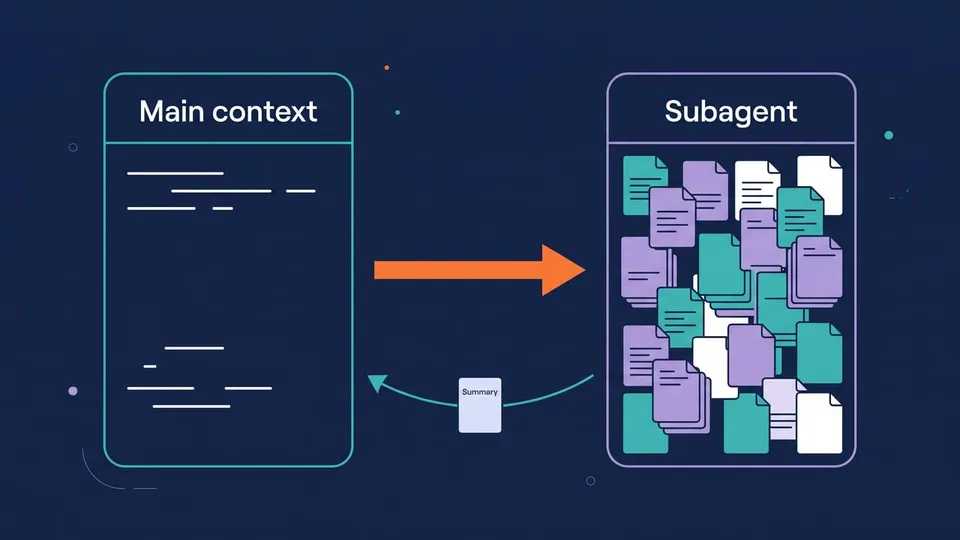
This helps in three situations:
- Tasks with a lot of output, like running the test suite, reading logs or searching a big codebase, where you only want the conclusion.
- Tasks that need limits: a code reviewer that can't edit files, a database agent that can only run
SELECT. - Tasks you repeat. You write the role once, commit it to the repository, and the whole team gets it.
A subagent starts fresh. It doesn't get your conversation history or the Claude Code system prompt. It gets its own prompt, the task message Claude writes for it, your CLAUDE.md files and a git status snapshot. So the task message needs to stand on its own, and Claude writes it with that in mind.
Important! Subagents count toward the same usage limits as your main conversation.
Built-in subagents
Claude Code already comes with some subagents, and you've probably seen them working without noticing:
| Subagent | What it does | Notes |
|---|---|---|
Explore | Searches and reads the codebase (quick, medium or very thorough) | Read-only |
Plan | Researches the code while you're in plan mode | Read-only |
general-purpose | Complex tasks with several steps | All tools |
claude-code-guide | Answers questions about Claude Code itself | Runs on Haiku |
When you ask "where is the authentication handled in this project?", Claude usually sends Explore to search, and you get the answer without dozens of file reads in your context.
How to create a custom subagent
Let's create a subagent that reviews uncommitted changes. It can read files and run git diff, but it can't edit anything.
1. Create the file
Subagents live in an agents folder. Where you put it decides who can use it:
| Location | Applies to |
|---|---|
.claude/agents/ | This project (commit it and the team gets it) |
~/.claude/agents/ | All your projects |
--agents flag (JSON) | Only the current session |
Plugin agents/ folder | Where the plugin is enabled |
When two subagents have the same name, the CLI flag wins over the project, and the project wins over your personal folder. On Windows, ~ is your user folder: C:\Users\<you>\.claude\agents.
Save this to .claude/agents/code-reviewer.md:
---
name: code-reviewer
description: Reviews uncommitted code changes for bugs, security issues and readability. Use proactively after writing or changing code.
tools: Read, Grep, Glob, Bash
model: sonnet
---

You are a senior code reviewer. You don't edit files.

When invoked:
1. Run `git diff` to see the uncommitted changes (and `git diff --cached` for staged ones).
2. Read the changed files when you need more context.
3. Review only what changed.

Report your findings grouped by priority:
- **Critical** (must fix): bugs, security issues, data loss
- **Warning** (should fix): error handling, edge cases
- **Suggestion** (nice to have): naming, readability

For each finding, give the file and line, explain the problem in one or two sentences and show the fix.
If there's nothing to report, say so in one line.
What each part does:
name: the identifier, in lowercase with hyphens.description: what Claude reads to decide when to delegate. Phrases like "use proactively" make Claude more likely to call it on its own.tools: the allowlist. WithoutEditandWrite, this subagent can't change files. If you leavetoolsout, it inherits all the tools available to subagents.model:sonnet,opus,haiku, a full model ID, orinherit(the same model as your conversation).- The body: the subagent's system prompt. Write it the way you'd brief a teammate who has never seen the project.
Tip: You don't need to restart Claude Code after editing the file: changes are picked up within seconds. You only need a restart when you create the first file in an agents folder that didn't exist before.
2. Use it
Make some change in the code and ask:
Use the code-reviewer subagent to review my changes
To test, I added this function to a project, with three problems on purpose:
export async function deleteUser(db, id) {
  const apiKey = 'sk-live-12345'
  await fetch(`https://api.example.com/users/${id}?key=${apiKey}`, { method: 'DELETE' })
  return db.query(`DELETE FROM users WHERE id = ${id}`)
}
The subagent ran git diff, read the file, and returned the review grouped by priority: the hardcoded API key, the key going in the URL (where it ends up in logs), the SQL injection, and, as a warning, that fetch doesn't throw on 4xx/5xx, so the row is deleted locally even when the remote delete fails. Only this report came back to my conversation; the diff and the files it read stayed in the subagent's context.
Claude Code subagent frontmatter: the fields you will use
Only name and description are required. These are the other fields that are most useful:
| Field | What it does |
|---|---|
tools / disallowedTools | Tools the subagent can use (allowlist) or can't use (denylist) |
model | sonnet, opus, haiku, a full model ID or inherit |
effort | Reasoning effort: low to max |
permissionMode | default, acceptEdits, auto, dontAsk, plan... |
skills | Skills loaded into the subagent's context when it starts |
mcpServers | MCP servers only this subagent can use |
hooks | Hooks that run only while this subagent is active |
memory | Persistent memory across sessions: user, project or local |
isolation: worktree | Runs the subagent in a temporary git worktree, so its edits don't touch your checkout |
background | true always runs it in the background |
maxTurns | Maximum number of turns before it stops |
The hooks field is good for rules that the prompt alone can't guarantee. The official docs show a db-reader subagent with a PreToolUse hook that blocks any INSERT, UPDATE or DELETE before the command runs. If you haven't used hooks yet, I explained how they work in Claude Code Hooks: A Practical Guide with Examples.
Note: Field names are case-sensitive (disallowedTools, not disallowed-tools), and unknown fields are ignored without any error. If a subagent doesn't show up, check the YAML first.
How to use subagents in Claude Code
There are a few ways to start a subagent:
- Let Claude decide. If the description matches the task, Claude delegates on its own.
- Ask in plain language: "use the code-reviewer subagent to...". This is the most reliable way.
- @-mention: type
@and pick the agent from the list, or type@agent-code-reviewerfollowed by the task. - Run the whole session as the agent:
claude --agent code-reviewer. The agent's prompt, tools and model apply to the main conversation. To make it the default in a project, add"agent": "code-reviewer"to.claude/settings.json. - Define it on the command line, for a single session or a script:
claude --agents '{
  "code-reviewer": {
    "description": "Reviews code changes. Use proactively after code changes.",
    "prompt": "You are a senior code reviewer. Focus on bugs and security.",
    "tools": ["Read", "Grep", "Glob", "Bash"],
    "model": "sonnet"
  }
}'
Tip: The /agents command used to open a wizard to create subagents. In current versions it only prints a reminder: ask Claude to create the subagent for you ("create a subagent in .claude/agents that runs the tests and reports only the failures"), or write the file yourself.
Forks: a subagent that knows the conversation
A regular subagent starts with an empty context. A fork is a subagent that inherits the whole conversation up to that point, so you don't have to explain the situation again. Its tool calls still stay out of your context, and only the result comes back. Start one with /subtask:
/subtask draft unit tests for the parser changes so far
The fork runs in the background while you keep working, and its result arrives as a message when it finishes. Since it shares the prompt cache with your conversation, it's cheaper than a fresh subagent for tasks that need the same context.
Running Claude Code subagents in parallel
By default, a subagent that Claude starts from your conversation runs in the background: you can keep talking to Claude while it works. You can also ask for several at once:
Research the authentication, database and API modules in parallel using separate subagents
Some details worth knowing:
- Running subagents show up in a panel below the prompt. Use the arrows and
Enterto open one's transcript and send it a message. /taskslists the background work of the session, including subagents that already finished.- If a task is running in the foreground,
Ctrl+Bmoves it to the background. - Up to 20 subagents can run at once (
CLAUDE_CODE_MAX_CONCURRENT_SUBAGENTSchanges it), and a subagent can start its own subagents up to three levels deep (CLAUDE_CODE_MAX_SUBAGENT_SPAWN_DEPTH).
Important! Parallel subagents that edit files can step on each other. For parallel edits, use isolation: worktree (each subagent gets its own copy of the repository) or give each one a separate set of files. I explained how worktrees work in Git Worktree: Multiple Branches (and AI Agents) in Parallel.
Claude Code custom slash commands
Claude Code also has slash commands: built-in ones like /clear and /model, and custom ones that you create. A custom command is a saved prompt: you type /name and Claude Code sends the content of the file as your message.
To create one, save a Markdown file in .claude/commands/ (project) or ~/.claude/commands/ (all your projects). The file name becomes the command name.
Note: Claude Code merged custom commands into skills. A file at .claude/commands/deploy.md and a skill at .claude/skills/deploy/SKILL.md both create /deploy and work the same way. The commands folder still works and is the simplest option for a single-file prompt. When you need extra files (scripts, templates) or want Claude to load the command on its own, use a skill. I covered skills in Claude Code Skills: How to Create Your Own.
Example: a command with arguments and command output
Let's create a command that summarizes what changed since the last commit. Save it to .claude/commands/git/summary.md:
---
description: Summarizes what changed since the last commit
argument-hint: [focus]
allowed-tools: Bash(git diff *) Bash(git status *)
---

## Changes

!`git status --short`

!`git diff --stat`

Summarize these changes in 3 bullet points for a teammate. $ARGUMENTS
What's in it:
- The subfolder becomes a namespace:
git/summary.mdis called as/git:summary. This keeps related commands together. descriptionshows up in the/menu.argument-hintshows what the command expects while you type it.- The
!`command`lines run before the prompt is sent, and their output replaces the line. Claude gets the git status ready, without spending a step to run it. If one of these commands fails, the whole command is cancelled. allowed-toolslets these git commands run without a permission prompt. The injected commands go through your permission rules, so without this line (or a matching allow rule) the command doesn't run.$ARGUMENTSis replaced with everything you type after the command name.
Running it:
/git:summary focus on security
In my test project, Claude listed the new deleteUser function, the hardcoded key and the SQL built with string interpolation, all in three bullets.
Arguments in custom commands
| Placeholder | Replaced with |
|---|---|
$ARGUMENTS | Everything you typed after the command |
$0, $1... | Each argument by position, starting at 0 (quotes group words: "hello world" is one argument) |
$name | A named argument declared in the arguments frontmatter field, like arguments: [issue, branch] |
If the file has no placeholder at all, Claude Code adds ARGUMENTS: <what you typed> at the end of the prompt, so the arguments aren't lost.
A slash command that runs in a subagent
With context: fork in the frontmatter, a command runs outside your conversation. Claude Code starts a subagent and gives it the command's content as the task. The agent field picks which subagent. It can be a built-in one (Explore, Plan, general-purpose) or one of yours.
Save this to .claude/commands/review-changes.md:
---
description: Reviews the uncommitted changes in a separate context with the code-reviewer subagent
context: fork
agent: code-reviewer
---

Review the uncommitted changes in this repository. $ARGUMENTS
Now /review-changes always runs the review with the code-reviewer we created earlier: its prompt, its read-only tools and its model.
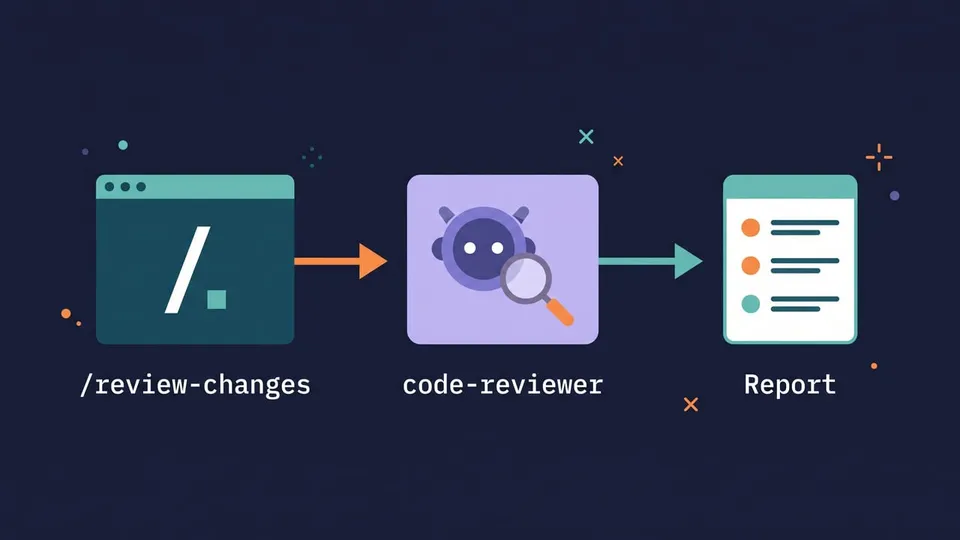
I ran it in non-interactive mode to look at the events:
claude -p "/review-changes" --output-format stream-json --verbose
The output showed the task going to subagent_type: "code-reviewer", running on claude-sonnet-5-5 (the model: sonnet from the subagent file), and the final answer was the same prioritized report from before. The whole run took 13 seconds and cost US$ 0.03 in API terms.
A few things to keep in mind:
- The subagent doesn't see your conversation, so write the command as a complete task. A command that only says "follow these conventions" gives the subagent nothing to do.
- The forked command runs in the background by default. Add
background: falseif you want Claude to wait for the result in the same turn. - In Git Bash,
claude -p "/review-changes"gets the/converted to a Windows path. Run it withMSYS_NO_PATHCONV=1in front, or use PowerShell.
Useful built-in Claude Code commands
Type / in Claude Code to see the full list. These are the ones that relate to subagents and context:
| Command | What it does |
|---|---|
/agents | Reminds you where subagent files live and how to create them |
/tasks | Lists and manages background work, including subagents |
/subtask <task> | Starts a fork that knows the whole conversation |
/btw <question> | Asks a side question without adding it to the conversation |
/context | Shows how much of the context window is in use, and by what |
/compact | Summarizes the conversation to free up context |
/clear | Starts a new conversation with an empty context |
/review | Reviews the current diff, a branch or a PR (alias of /code-review) |
/simplify | Runs four review agents in parallel on the changed code and applies the fixes |
/skills | Lists the available skills and custom commands |
/init | Creates a CLAUDE.md for the project |
MCP servers can also expose prompts that show up as commands in the same / menu.
Subagents vs agent teams vs skills
Claude Code has a few features that sound alike. This is how they compare:
| Feature | How it works | Use it for |
|---|---|---|
| Subagent | Separate context, reports back only to the agent that started it | Focused tasks where only the result matters |
| Agent team | Several full Claude Code sessions with a shared task list, messaging each other | Work that needs discussion: parallel review, competing hypotheses for a bug |
| Skill | Instructions loaded into the current context when used | Procedures and knowledge: "how we do X here" |
| Custom command | A saved prompt you run with /name | Prompts you type often; with context: fork, a shortcut to a subagent |
Agent teams are still experimental and disabled by default. To try them, set CLAUDE_CODE_EXPERIMENTAL_AGENT_TEAMS to 1 in the env of your settings.json and ask Claude for teammates. They use a lot more tokens than subagents, because each teammate is a separate Claude instance, and they only work in interactive sessions. The docs recommend starting with 3 to 5 teammates. Your subagent files can be reused as teammate roles ("spawn a teammate using the code-reviewer agent type").
Tips for writing subagents that work
- Give each subagent one job. A "reviewer" and a "test runner" work better than a "helper" that does everything.
- Make the description specific, since it's what Claude uses to pick the subagent. Say what it does and when to use it, with the words you use when you ask.
- Give it only the tools it needs. A reviewer doesn't need
Edit, and fewer tools means fewer permission prompts. - Ask for a short result. The subagent's answer goes into your context, so "report only the failing tests" is better than "run the tests".
- Pick the model by task. Searching and summarizing work fine on
haikuorsonnet; keepopusorinheritfor reviews and design. - Keep small things in the main conversation. For quick edits and back-and-forth work it's faster, because a subagent has to rebuild context from scratch every time.
- Commit
.claude/agents/and.claude/commands/, so the whole team uses the same reviewer and the same commands.
FAQ
Where are Claude Code subagents stored?
Project subagents are in .claude/agents/*.md inside the repository, and personal ones in ~/.claude/agents/*.md (on Windows, C:\Users\<you>\.claude\agents). Subfolders are scanned too, and the subagent's identity comes from the name field, not from the file name.
Can Claude Code subagents run in parallel?
Yes. Subagents that Claude starts from your conversation run in the background by default, and up to 20 can run at the same time. Ask for it explicitly ("in parallel, using separate subagents"), and keep subagents that edit files away from each other's files, or use isolation: worktree.
Can a subagent use a different model?
Yes. Set model in the frontmatter to sonnet, opus, haiku, a full model ID, or inherit. To force every subagent onto one model, set CLAUDE_CODE_SUBAGENT_MODEL together with CLAUDE_CODE_SUBAGENT_MODEL_FORCE=1 in the env of your settings.
Do custom slash commands still work after the merge with skills?
Yes. Files in .claude/commands/ and ~/.claude/commands/ keep working and accept the same frontmatter as skills, except name and paths. If a skill and a command have the same name, the skill wins.
Conclusion
Subagents are how you keep a long Claude Code session clean: the heavy work happens in a separate context and only the result comes back. Start with one subagent for a task you repeat (a reviewer, a test runner), limit its tools, and ask for a short report. Then wrap it in a custom slash command with context: fork and agent, and the whole workflow becomes a single /command.
If you want to go further, see how skills package procedures and scripts, and how hooks enforce rules that must run every time.
Links
- Create custom subagents (Claude Code docs)
- Extend Claude with skills (custom commands)
- Claude Code commands reference
- Orchestrate teams of Claude Code sessions
- How and when to use subagents in Claude Code (Anthropic blog)
Tags: ai|claude-code|productivity